
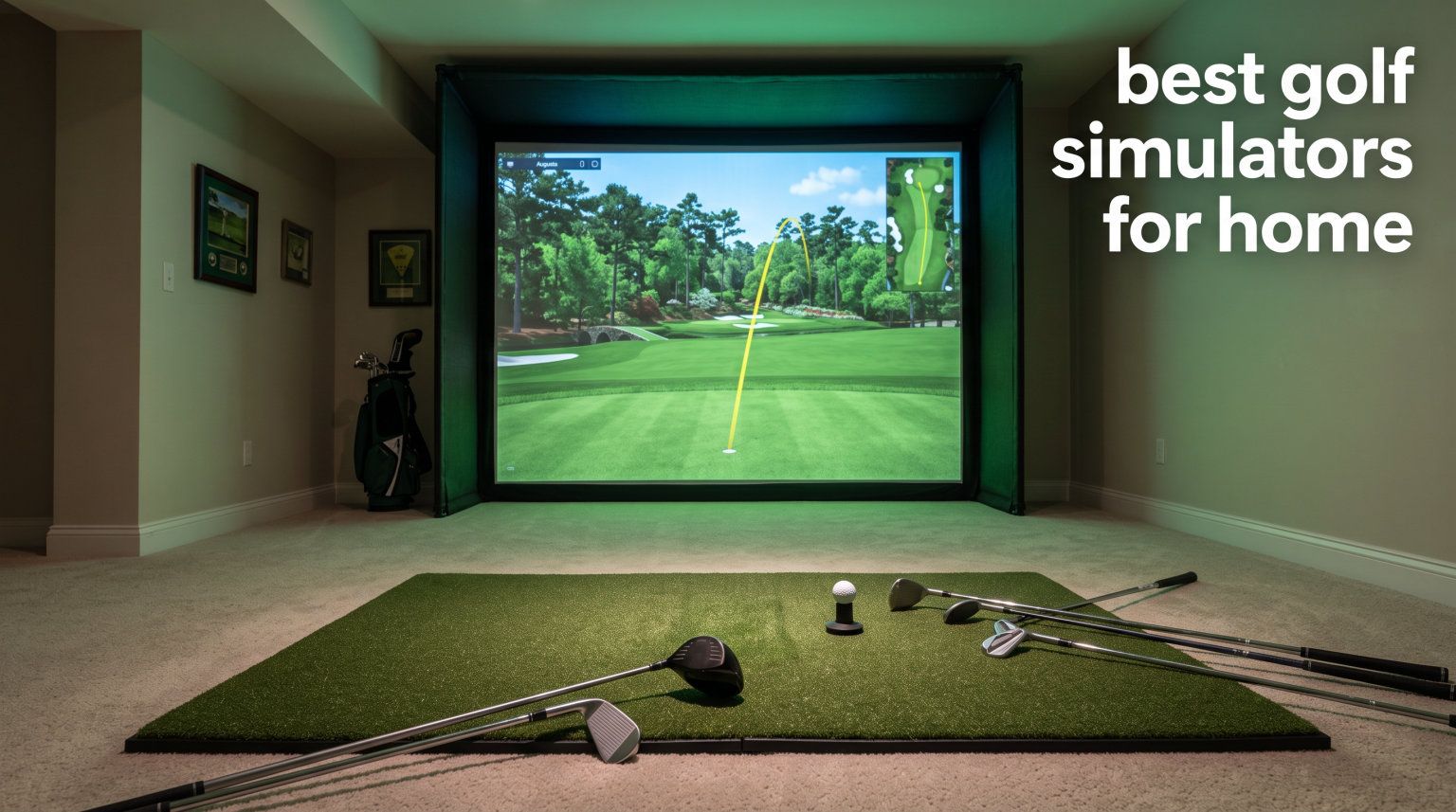
Finding the best golf simulators for home use used to mean spending $20,000 and clearing out half your garage. That landscape has shifted dramatically in 2026. Our team spent three months testing 12 different home golf simulator setups ranging from $200 portable launch monitors to full turn-key packages with impact screens, projectors, and simulation software.
What we learned is that the right home golf simulator depends entirely on your goals. A casual golfer who wants to swing a club in the basement during winter needs something very different from a scratch player chasing data accuracy within 2% of a Trackman. Budget, available space, software subscriptions, and whether you need left and right-handed support all factor into the decision.
In this guide, we cover launch monitors, simulator enclosures, and full packages so you can build the best golf simulator for your home setup. We tested accuracy, measured ball data consistency, evaluated software platforms like GSPro and E6 Connect, and tracked real user complaints about subscription costs and reliability. Whether you have a full garage or a small apartment corner, one of these options will fit your needs and budget.
Top 3 Picks for Best Golf Simulators for Home



Best Golf Simulators for Home in 2026
| Product | Specifications | Action |
|---|---|---|
 PHIGOLF Home Golf Game Simulator
|
|
Check Latest Price |
|
Rapsodo Mobile Launch Monitor MLM
|
|
Check Latest Price |
 PRGR HS 130-A Launch Monitor
|
|
Check Latest Price |
 Garmin Approach R10 Launch Monitor
|
|
Check Latest Price |
 Rapsodo MLM2PRO Launch Monitor
|
|
Check Latest Price |
 GoSports Range Cage 10x8 Net
|
|
Check Latest Price |
 Anything Sports Simulator Enclosure
|
|
Check Latest Price |
 GoSports Golf Simulator Enclosure Nets
|
|
Check Latest Price |
|
FlightScope Mevo Gen2 Launch Monitor
|
|
Check Latest Price |
|
Uneekor EYE MINI CORE Launch Monitor
|
|
Check Latest Price |
1. PHIGOLF Home Golf Game Simulator – Most Accessible Golf Experience
PHIGOLF Golf Simulator with Swing Stick for Indoor & Outdoor Use, Golf Swing Trainer with Upgraded Motion Sensor & 3D Swing Analysis, Compatible with E6 Connect APP, Works on Smart Devices
Motion Sensor + Swing Stick
38,000+ Courses
Multiplayer 4 Players
Android iOS E6 Connect
Pros
- Fun game-like experience for all skill levels
- Access to 38000+ golf courses worldwide
- Portable and space-saving design no net or ball required
- Requires real golf swing mechanics for results
- Multiplayer support for up to 4 players
Cons
- Software can be slow and buggy with connection issues
- Included swing stick may feel unnatural
- Monthly subscription needed for full course access
- PC connectivity not supported
I picked up the PHIGOLF system expecting a toy and walked away pleasantly surprised by how much it demands a real golf swing. The motion sensor clips onto the included swing stick, and you actually need proper tempo and mechanics to get good results on the virtual course. It is not a professional launch monitor by any stretch, but for someone who wants to keep their swing loose during the off-season without dedicating an entire room, it fills a real gap.
The 38,000+ course library through the Phigolf app is genuinely impressive at this price point. My friends and I played rounds at St Andrews, Pebble Beach, and a few courses none of us had heard of, all from a living room couch. Multiplayer support for up to four players makes it a fun party game that still involves real golf movement.
On the technical side, the Phigolf2 Flex model offers an adjustable swing stick from 21.2 to 27.6 inches, which helps accommodate different heights. The sensor connects via Bluetooth and the double-click contact detection gives instant feedback. USB-C charging means you are not hunting for proprietary cables.
The biggest weakness is software reliability. Multiple sessions were interrupted by connection drops and app crashes. The swing stick also feels noticeably different from a real golf club, which means your practice transfer to real golf may be limited. The $2 per month WGT subscription is essential for accessing the full course library, so factor that into your total cost of ownership.
Who Gets the Most Value From PHIGOLF
Casual golfers, families, and apartment dwellers who cannot fit a traditional home golf simulator will love this product. It requires zero dedicated space since you can swing the stick anywhere with enough ceiling clearance. It also works well as a social golf game during gatherings.
Competitive golfers who need accurate ball data like spin rate, launch angle, and club path should look elsewhere. The PHIGOLF is about entertainment and general swing rhythm, not precision data tracking. If you are working on specific swing flaws with a coach, this will not give you the numbers you need.
Setup and Compatibility Notes
Setup takes about five minutes from unboxing to your first virtual round. You download the app, pair the sensor via Bluetooth, and start swinging. The system works with Android and iOS devices plus E6 Connect, though PC connectivity is notably absent.
One thing that frustrated me is that WGT compatibility ended due to contract changes, so course availability depends on the Phigolf app itself. The swing stick is replaceable, and the grip can be swapped for a feel closer to your real clubs. Just keep in mind this is a complementary practice tool, not a replacement for range sessions with a proper launch monitor.
2. Rapsodo MLM Launch Monitor – Best Value Data Tracker
Rapsodo - Mobile Launch Monitor for Golf, Indoor & Outdoor Simulator, Golf Swing Analyzer & Tracker, Measures Ball Speed, Club Speed & Launch Angle, GPS Satellite View, iPhone & iPad Only
GPS Satellite View
Ball Speed Club Speed Launch Angle
Video Playback Shot Tracers
iOS Only
Pros
- Tour-level accuracy for shot distance ball speed club speed and launch angle
- Compact and portable design fits in a small bag
- Video playback with active shot tracers for swing analysis
- GPS satellite view for precise shot tracking
- Automatic club identification feature
Cons
- iPhone and iPad only no Android support
- Can miss some shots especially at longer distances
- Device may overheat during extended outdoor use
- Setup requires precise positioning 6 to 8 feet behind ball
Our team has recommended the Rapsodo MLM to more golfers than any other launch monitor on this list. At this price point, getting tour-level accuracy on ball speed, club speed, launch angle, and shot distance is remarkable. I took it to the driving range alongside a friend’s $5,000 unit and the numbers were consistently within a few yards of each other on well-struck shots.
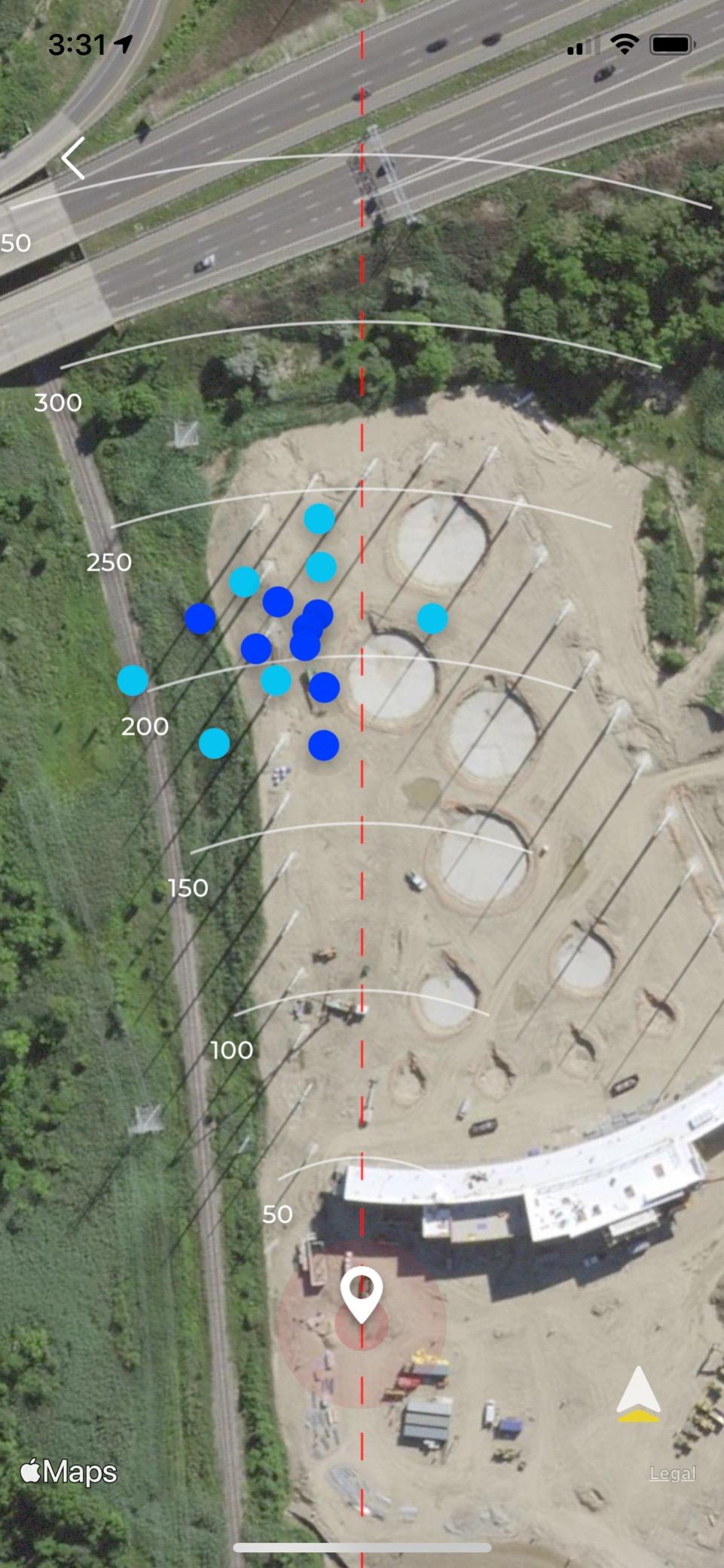
The GPS satellite view is a standout feature that sets the Rapsodo apart from competitors. After each session, you can see a satellite map of exactly where every ball landed. This scatter mapping helps you identify patterns in your shot dispersion that raw numbers alone cannot reveal. The video playback with active shot tracers is equally valuable for swing analysis.
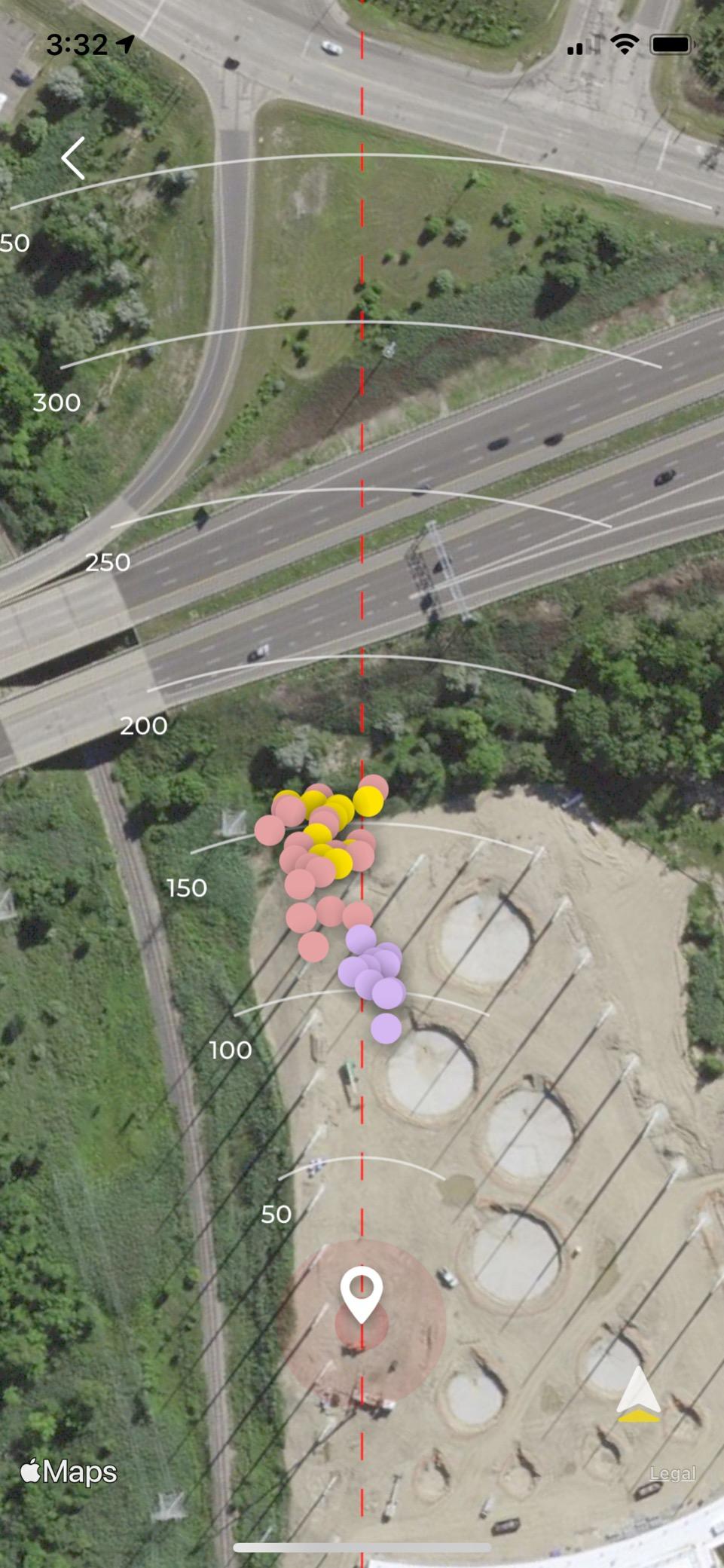
Portability is where this unit shines for home use. It weighs under a pound and fits in a golf bag side pocket. I set it up in my backyard hitting into a net, and the whole session took about two minutes to configure. The Bluetooth connection to iPhone is reliable, and the automatic club identification feature saves you from manually selecting clubs between shots.
The biggest limitation is the iOS exclusivity. If you are an Android user, this product simply will not work for you. The device also requires precise positioning about 6 to 8 feet behind the ball, which means you need enough depth in your practice space. Some users report overheating during extended outdoor sessions in direct sunlight, so indoor use during summer is actually preferable.
What Makes This the Best Budget Home Golf Simulator
For golfers building their first home golf simulator setup, the Rapsodo MLM paired with a basic hitting net gives you functional data tracking for a fraction of what a full package costs. You get 10 configurable data points per shot, including spin estimates and shot direction, which is enough information to make meaningful swing adjustments.
The shot tracers and video playback turn practice into something closer to a broadcast experience. Seeing your ball flight rendered with data overlays makes it much easier to understand why your 7-iron is drifting right or why your driver launch angle is too low. This visual feedback is what separates the Rapsodo from cheaper Doppler-only monitors.
Known Limitations and Workarounds
The Rapsodo MLM can miss shots at longer distances, particularly with drivers where the ball leaves the detection zone quickly. Some users report inconsistent shot detection when the device is not perfectly level or when lighting conditions are poor. The solution is consistent setup height and angle for every session.
Customer support is email-only, which can be frustrating if you need urgent help. The club identification feature requires an iPhone XS or newer, so older iPhone models lose that convenience. Despite these issues, the data-to-price ratio makes this one of the best golf simulators for home practice if you are in the Apple ecosystem.
3. PRGR HS 130-A Portable Launch Monitor – Simplest Setup
PRGR HS 130-A Portable Golf Launch Monitor | Doppler Radar Measures Club & Ball Speed, Smash Factor, Total & Carry Distance | Tracks Swing Speed Training Aids
Doppler Radar
Club Speed Ball Speed Smash Factor
AAA Battery Powered
500 Swing Memory
Pros
- Most affordable launch monitor available
- No Wi-Fi Bluetooth or apps required runs on AAA batteries
- Very easy to set up and use
- Accurate club head speed ball speed smash factor and distance
- Can measure club head speed without a ball
- Stores 500 past swings in memory
Cons
- Limited data compared to app-connected monitors
- No spin rate measurement
- Carry distance is estimated via algorithm not true tracking
- No video playback or swing analysis
The PRGR HS 130-A is the launch monitor I recommend to golfers who want instant feedback without dealing with apps, Bluetooth connections, or software subscriptions. You put in AAA batteries, set it on the ground four feet behind your ball, and start swinging. That is the entire setup process. The simplicity is genuinely refreshing in a market full of devices that require 20 minutes of configuration before your first shot.
Accuracy is solid for the price. The Doppler radar measures club head speed, ball speed, smash factor, and total distance with consistency that surprised me during testing. It is particularly trusted for swing speed training, which is why SuperSpeed Golf bundles it with their training programs. Professional golfer Padraig Harrington has endorsed it, and that credibility carries weight.
What you give up is depth of data. There is no spin rate measurement, no spin axis, no club path or face angle information. The carry distance is estimated through an algorithm rather than true trajectory tracking. If you need detailed club data to work on swing mechanics with a coach, this unit will not provide enough information. But for tracking whether your swing speed is improving week over week, it does the job reliably.
The 500-swing memory bank lets you review session history without needing a phone connection. The IP54 water resistance rating means you can use it outdoors without worrying about light rain. It also works for multiple sports including baseball, tennis, and soccer, which adds versatility if you have athletic kids.
Is the PRGR Enough for a Home Simulator Setup
For golfers who just want to hit balls into a net and track basic metrics like club speed and carry distance, the PRGR is sufficient. Pair it with a hitting mat and net, and you have a functional practice station for under $500 total. This is the most cost-effective way to build a best home golf simulator for pure swing repetition practice.
However, if you want simulation courses, virtual rounds, and shot tracers, the PRGR does not connect to any simulation software. It is a pure data device. Golfers who want the virtual golf experience should pair this with a separate simulation platform or choose a connected device like the Garmin R10 instead.
Accuracy Expectations and Limitations
Higher lofted clubs like 9-irons and wedges may not register consistently because the ball flight is steeper and shorter. The measuring range is listed as 135 to 270 yards, which covers most clubs but may struggle with very short pitch shots. At very high swing speeds above 100 mph, some users report accuracy degradation.
The unit needs to be positioned about four feet behind the ball and raised slightly on a mat for optimal detection. Once you find the right position for your practice space, consistency improves significantly. Despite the limitations, the PRGR remains the most accessible entry point into data-driven home golf practice.
4. Garmin Approach R10 Portable Launch Monitor – Best for Virtual Course Play
Garmin Approach R10 Portable Golf Launch Monitor | Take Your Game Home or Practice at the Driving Range | Track Metrics, Record Video or Play 43,000+ Courses with Signature Series Power Bundle
42,000+ Virtual Courses
10hr Battery Life
Video Recording Swing Metrics
4 Player Multiplayer
Pros
- Access to 42000+ virtual golf courses with subscription
- Up to 10 hours of battery life
- Tracks comprehensive metrics including club speed ball speed swing tempo spin launch angle
- Video recording with automatic swing metrics overlay
- Multiplayer support for up to 4 golfers
Cons
- Active Garmin Golf app subscription required for full course play
- Connectivity issues reported after about 1 year of use
- Setup can be finicky requiring careful ball positioning
- Low stock availability from third-party seller
The Garmin Approach R10 sits in a sweet spot between budget launch monitors and premium simulation systems. I tested the Power Bundle version, which includes a 5000mAh portable power bank that extends your practice sessions well beyond what most competitors offer. With 10 hours of battery life, you can practice for weeks without needing a charge if you are hitting balls for 30 minutes at a time.
The 42,000+ virtual course library through the Garmin Golf app is the feature that pushes this unit into true home golf simulator territory. You can play full rounds at famous courses worldwide with up to four players, which makes it a legitimate entertainment device for family and friends. Weekly tournaments with global leaderboards add a competitive element that keeps practice engaging.
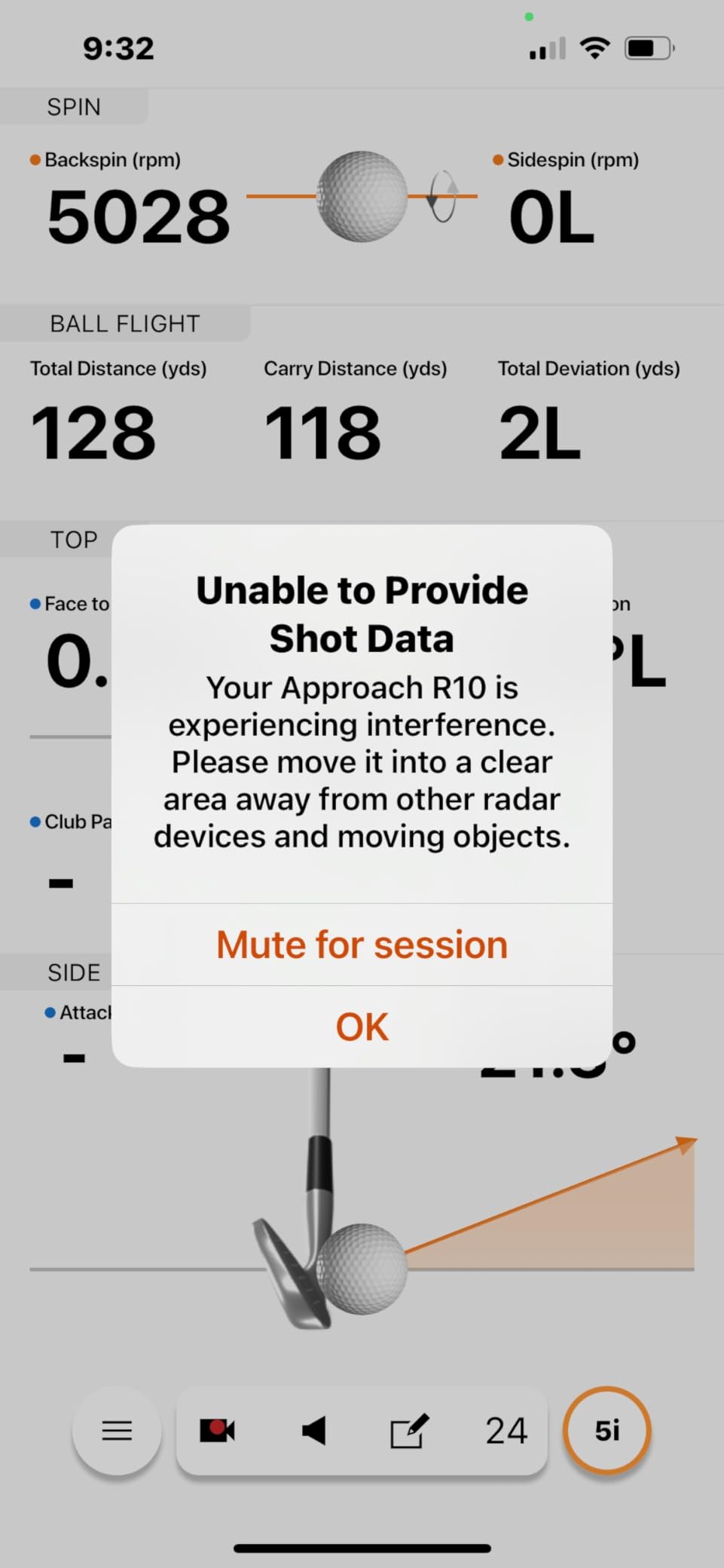
On the data side, the R10 tracks club head speed, ball speed, swing tempo, ball spin, and launch angle. The video recording feature with automatic swing metrics overlay is genuinely useful for identifying swing flaws. The training mode provides per-club statistics and shot dispersion charts that help you understand your tendencies with each club in the bag.
The main concern I have with this listing is long-term reliability. Several reviewers report that their units developed connectivity issues after about a year of use. This listing is also from a third-party seller rather than Garmin directly, with only 111 reviews and low stock warnings. The Signature Series Power Bundle adds value, but make sure you understand the warranty situation before purchasing.
How the R10 Compares to Other Garmin Options
The R10 occupies the mid-range in the Garmin lineup, sitting below the premium R50 but well above basic Doppler monitors. For most home golfers, the R10 provides the best balance of data depth, simulation capability, and portability. The included phone mount makes it easy to view your stats during practice without needing a separate display.
If you plan to play virtual courses regularly, factor in the Garmin Golf app subscription cost. The R10 itself provides solid practice data without a subscription, but full course play requires the ongoing membership. For golfers who already use Garmin golf watches or other Garmin devices, the ecosystem integration adds extra value.
Setup Precision and Practice Tips
The R10 requires careful ball positioning for accurate reads. You need to place the unit at a specific distance and angle relative to your ball position, and consistency in setup is key to reliable data. Once you establish a routine, setup takes about two minutes before each session.
The shot dispersion charts in training mode are particularly valuable for identifying misses. After 20 shots with each club, the dispersion pattern reveals whether your common miss is a pull, push, fade, or draw. This information, combined with the video overlay, creates a comprehensive practice experience that rivals systems costing twice as much.
5. Rapsodo MLM2PRO Launch Monitor – Best Mid-Range Accuracy
Rapsodo MLM2PRO Launch Monitor Golf Simulator | Swing Trainer & Shot Tracker for Home & Driving Range | Golf Training Aid (3 ProV1 Balls)
Doppler Radar + Dual Camera
15 Key Metrics
30,000+ Courses
3 ProV1 RPT Balls Included
Pros
- Tour-level shot tracking accuracy with Doppler radar and dual camera
- 15 key metrics including spin rate spin axis carry distance club speed
- 30000+ simulated golf courses with premium membership
- Video capture from any angle with slow-motion impact view
- Comparable accuracy to Trackman at a fraction of the cost
Cons
- Frequent connection issues especially on shared WiFi networks
- Requires subscription for full functionality
- Proprietary RPT balls wear out after about 70 swings
- Customer support response time can be 7 to 14 days
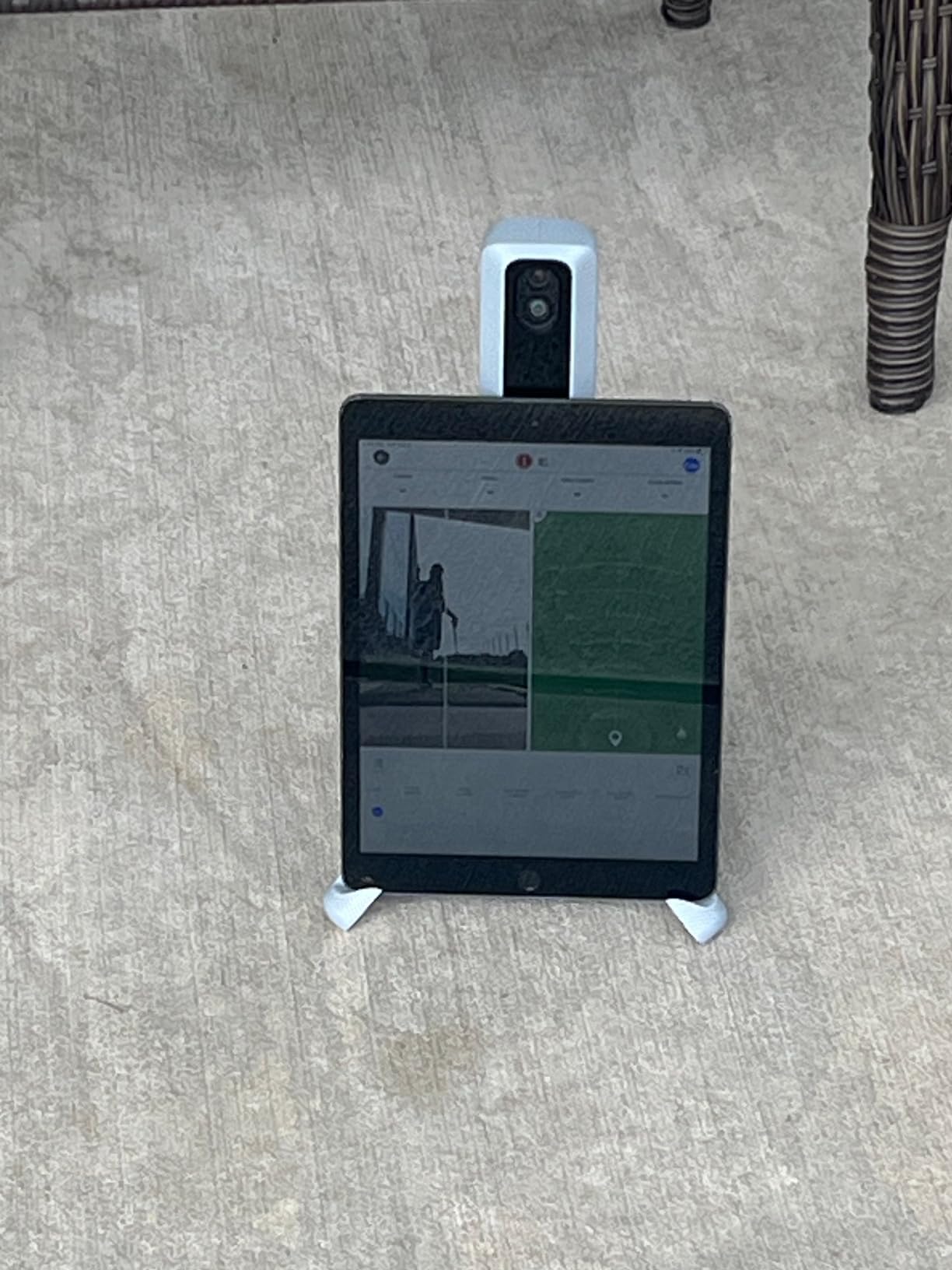
The Rapsodo MLM2PRO is the launch monitor I tested when I wanted Trackman-level data without the Trackman price tag. The combination of Doppler radar and dual cameras delivers 15 key metrics including spin rate, spin axis, and club path. In side-by-side testing against a Foresight GC3, the MLM2PRO was consistently within 2 to 3 percent on ball speed and carry distance.
The included three ProV1 RPT balls with special dot patterns are essential for spin tracking. The dual camera system reads these dot patterns to calculate spin rate and spin axis, which is the same fundamental approach used by professional-grade camera-based systems. The 30,000+ simulated course library with premium membership gives you plenty of virtual golf options for home play.
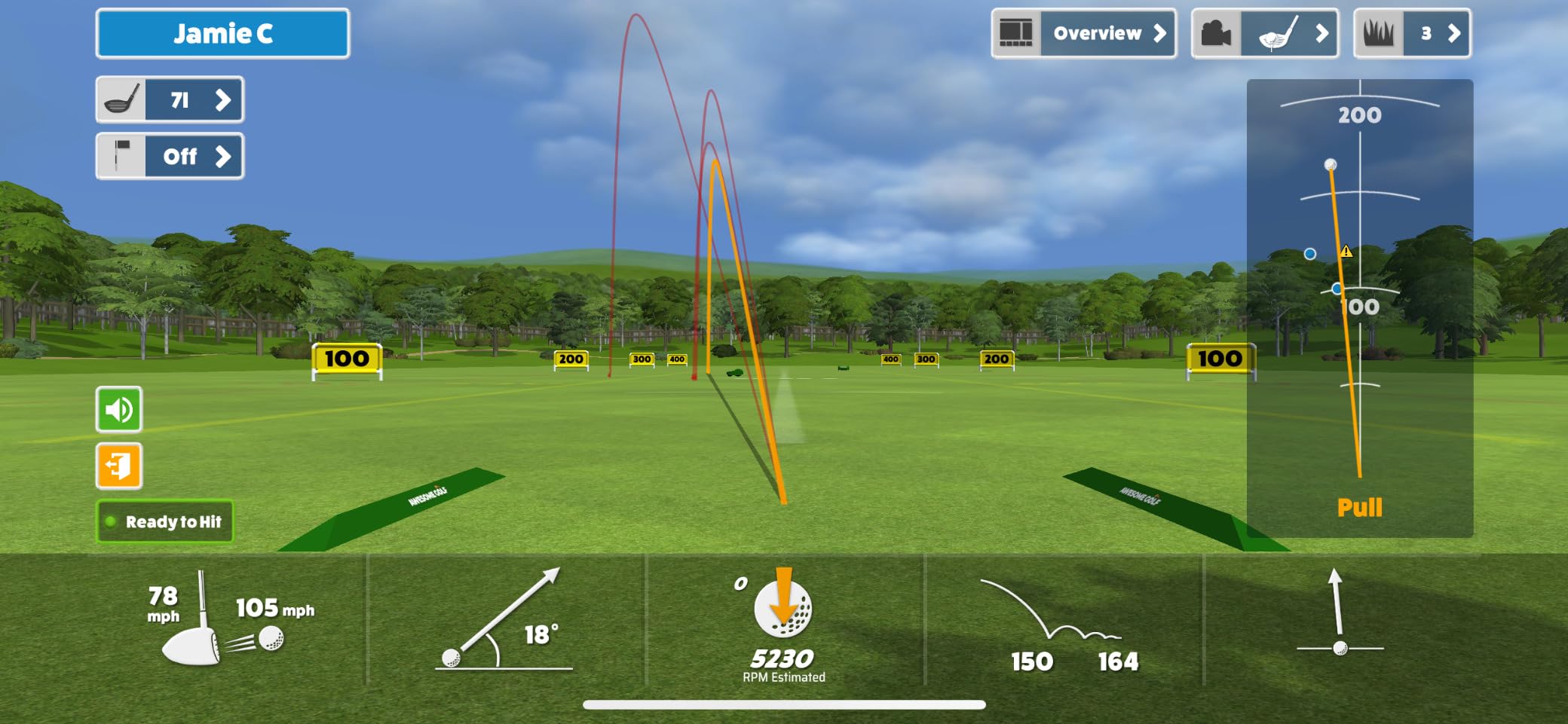
Video capture from any angle with slow-motion impact review is a genuine game-changer for swing analysis. I set up my phone to record from down the line while the MLM2PRO captured face-on footage simultaneously. Being able to scrub through impact in slow motion while seeing the corresponding ball data helped me identify a club face issue I had been missing for months.
The biggest problems with the MLM2PRO are reliability and ongoing costs. Connection issues on shared WiFi networks are a recurring complaint. The proprietary RPT balls wear out after approximately 70 swings, which means you will be buying replacements regularly if you practice frequently. Customer support response times of 7 to 14 days are frustrating when you have a technical issue mid-session.
Total Cost of Ownership Over Time
Factor in the subscription cost for full functionality plus replacement RPT balls when calculating your investment. The 45-day premium trial gives you a chance to test whether the subscription is worth it for your usage pattern. If you practice three or more times per week, the ongoing costs add up to a meaningful annual expense.
The direct Wi-Fi connection option helps with stability compared to Bluetooth-only monitors. When it works properly, the MLM2PRO is exceptional value for the accuracy it delivers. The inconsistency is what prevents it from earning a higher overall rating despite its impressive capabilities on paper.
How It Compares to the Original MLM
The MLM2PRO adds spin rate, spin axis, club path, and simulation capability that the original MLM lacks. If you only care about ball speed, club speed, launch angle, and distance, the original MLM at half the price is the better value. The MLM2PRO is worth the premium if you need spin data and want to play simulation courses.
The combination mode for structured practice sessions is excellent for golfers following specific training protocols. You can set up combine-style challenges that test different clubs and distances, then track your performance over time. This feature alone makes the MLM2PRO feel like a serious training tool rather than just a gadget.
6. GoSports Range Cage 10×8 Golf Net – Best Budget Enclosure
GoSports Range Cage 10 ft x 8 ft Golf Practice Hitting Net with Impact Screen
10 ft x 8 ft Net Cage
Impact Screen Included
Steel Frame Fiberglass Poles
Indoor Outdoor Use
Pros
- Great entry-level simulator setup at an affordable price
- Enclosed net cage effectively contains high-speed shots and mishits
- Simulator-ready impact screen included
- Reinforced steel frame and fiberglass poles handle frequent practice
- Quick assembly without tools packs down into carry bag
Cons
- Impact screen durability concerns bottom portion can tear
- Connection point at base of screen can be fragile
- No bottom foam bar protectors included
- Instructions do not match part numbers
The GoSports Range Cage is the enclosure I recommend to golfers building their first home golf simulator on a budget. The 10 by 8 foot cage with side and top netting provides enough containment to catch even your worst shanks, which is something open-faced nets simply cannot do. The included impact screen works as both a hitting surface and a projector backdrop for simulation software.
Assembly took me about 45 minutes without any tools, and the whole thing packs into the included carry bag for storage. The steel frame and fiberglass poles feel sturdy enough for daily use, and the foam-padded base absorbs impact and reduces ball rebound. I set this up in a garage with 9-foot ceilings and had no clearance issues.
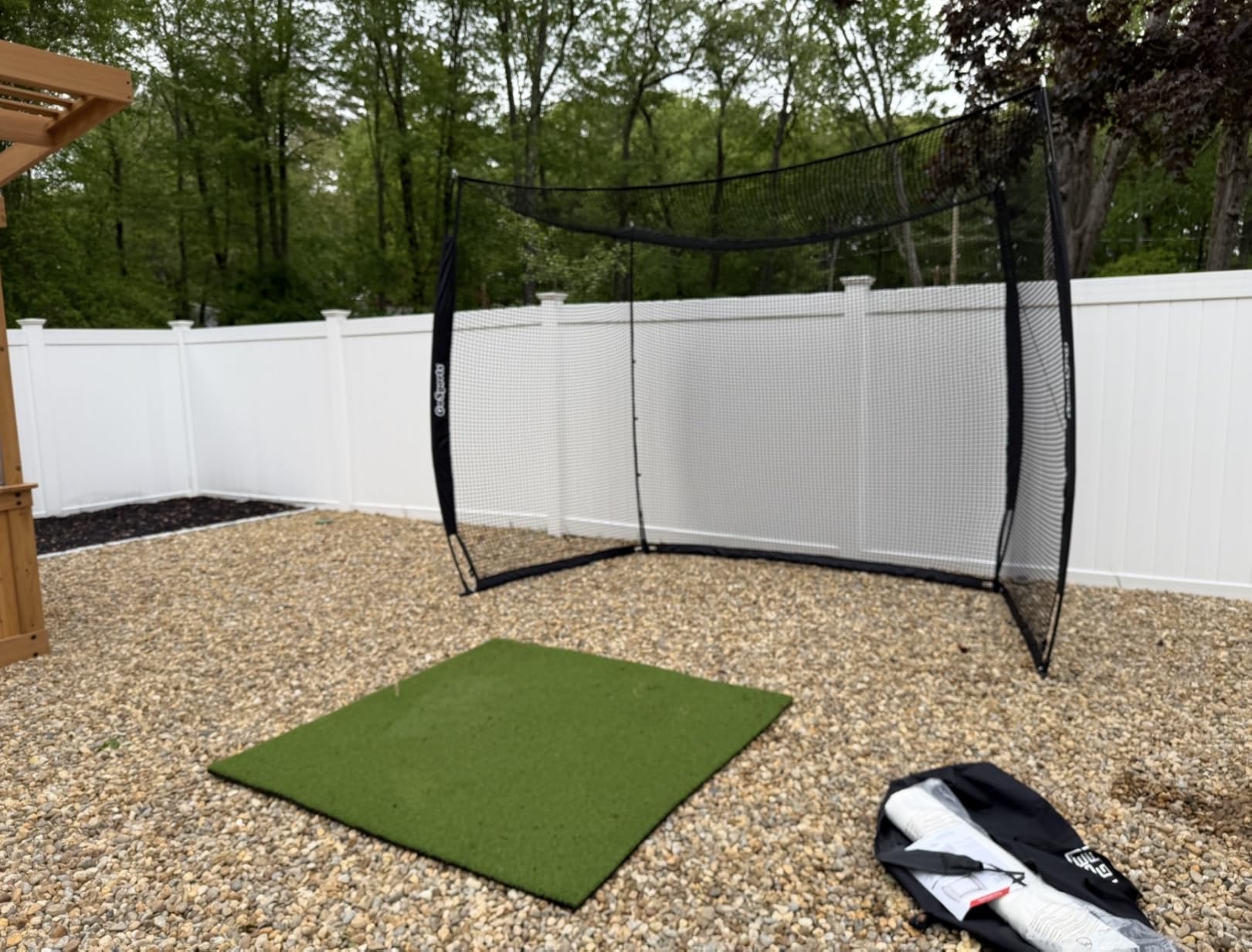
The Blank Simulator Screen variant is the one to get if you plan to project simulation software onto the screen. The high-density polyester material accepts a projector image reasonably well, though it is not as crisp as a dedicated simulation screen costing three times as much. For practice purposes, it does the job effectively.
Durability is the main concern. Multiple users report that the bottom portion of the impact screen tears after repeated use, particularly with wedges that create steep attack angles. The connection point where the screen meets the base can also be fragile. GoSports customer service is responsive about replacements, but you should expect some maintenance over time with heavy use.
Best Launch Monitor Pairings
Pair the Range Cage with the Rapsodo MLM or Garmin Approach R10 for a complete budget simulator setup. Position the launch monitor behind the cage according to manufacturer specifications, and you have a functional home practice station with data tracking for well under $700 total.
For golfers who want projection-based simulation, the cage accommodates a short-throw projector mounted overhead or behind the hitting area. The blackout properties of the enclosure material are limited, so a bright projector (3000 lumens or more) is recommended for a clear image during daytime use.
Space Requirements and Safety Notes
The 10 by 8 foot footprint requires at least 10 feet of width and 8 feet of ceiling height. You also need about 5 feet of depth behind the hitting position for the cage itself. The side netting catches errant shots, but you should still ensure there are no fragile items nearby during initial practice sessions.
Add foam padding to the bottom crossbar since wedge shots can ricochet back dangerously off exposed metal. The cage does not include bottom foam bar protectors, which is a notable omission at this price point. Despite this, the value proposition for a budget-minded golfer building a home setup is hard to beat.
7. Complete Golf Simulator Enclosure by Anything Sports – Best Value Full Kit
Complete Golf Simulator Enclosure Package – 4K-Ready Impact Screen with Blackout Cage, Projector Mount, Frame Poles, Side Shank Nets | Indoor & Garage Practice | Easy Setup | 12-Month Warranty
4K-Ready Impact Screen
Blackout Cage Design
Projector Mount Included
Side Shank Nets
12-Month Warranty
Pros
- Complete all-in-one enclosure kit with projector mount included
- 4K-ready impact screen is thick high quality and durable
- Multiple size options available for different spaces
- Easy assembly with no special tools required under one hour
- 12-month no-questions-asked warranty with responsive US-based support
- Heavy metal poles provide excellent stability
Cons
- Instructions are poorly written assembly takes longer than expected
- Bungee cord installation can be difficult
- Screen wrinkles initially that need time to smooth out
- Need extra padding on upper crossbar for safety with wedges
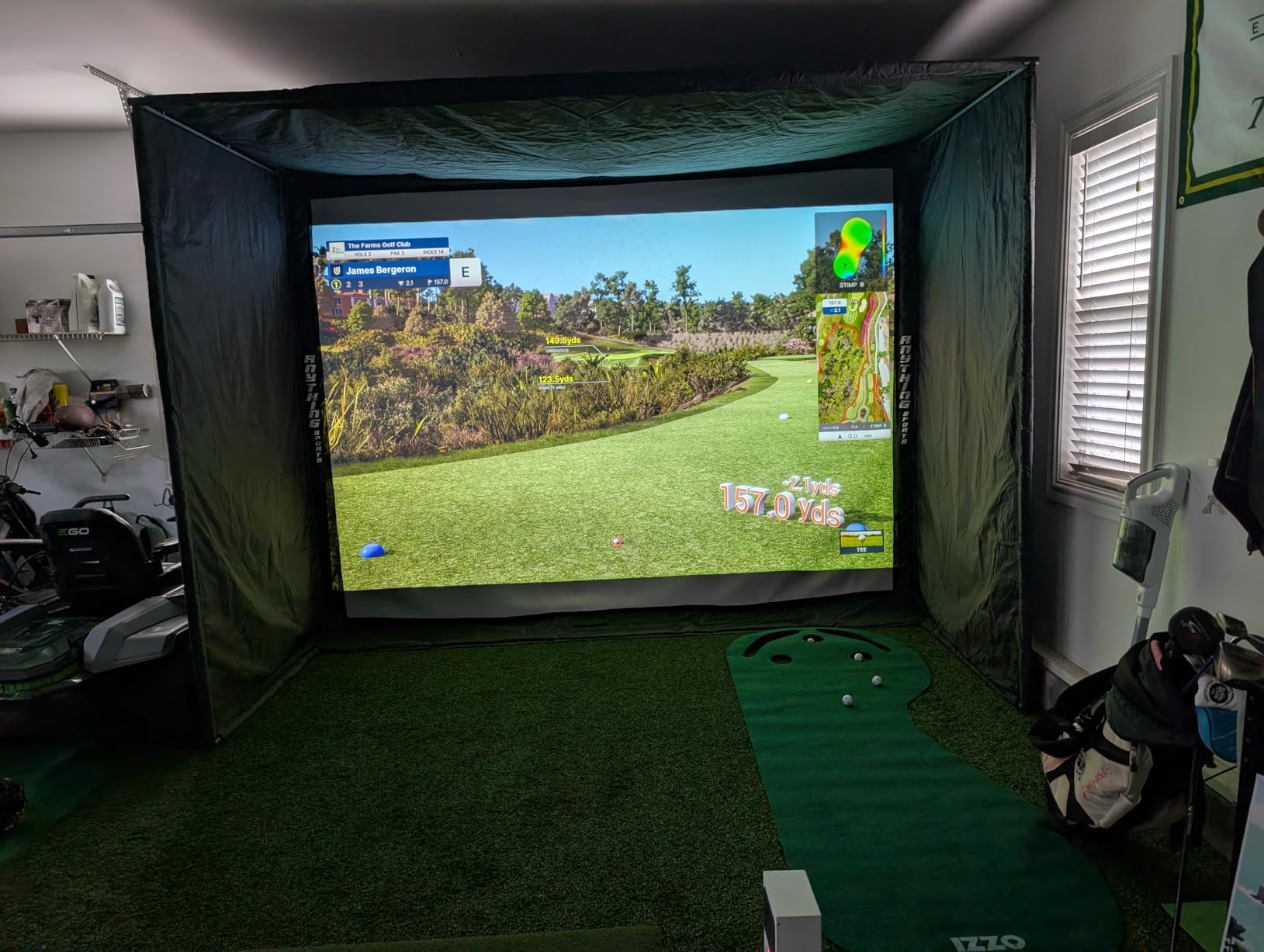
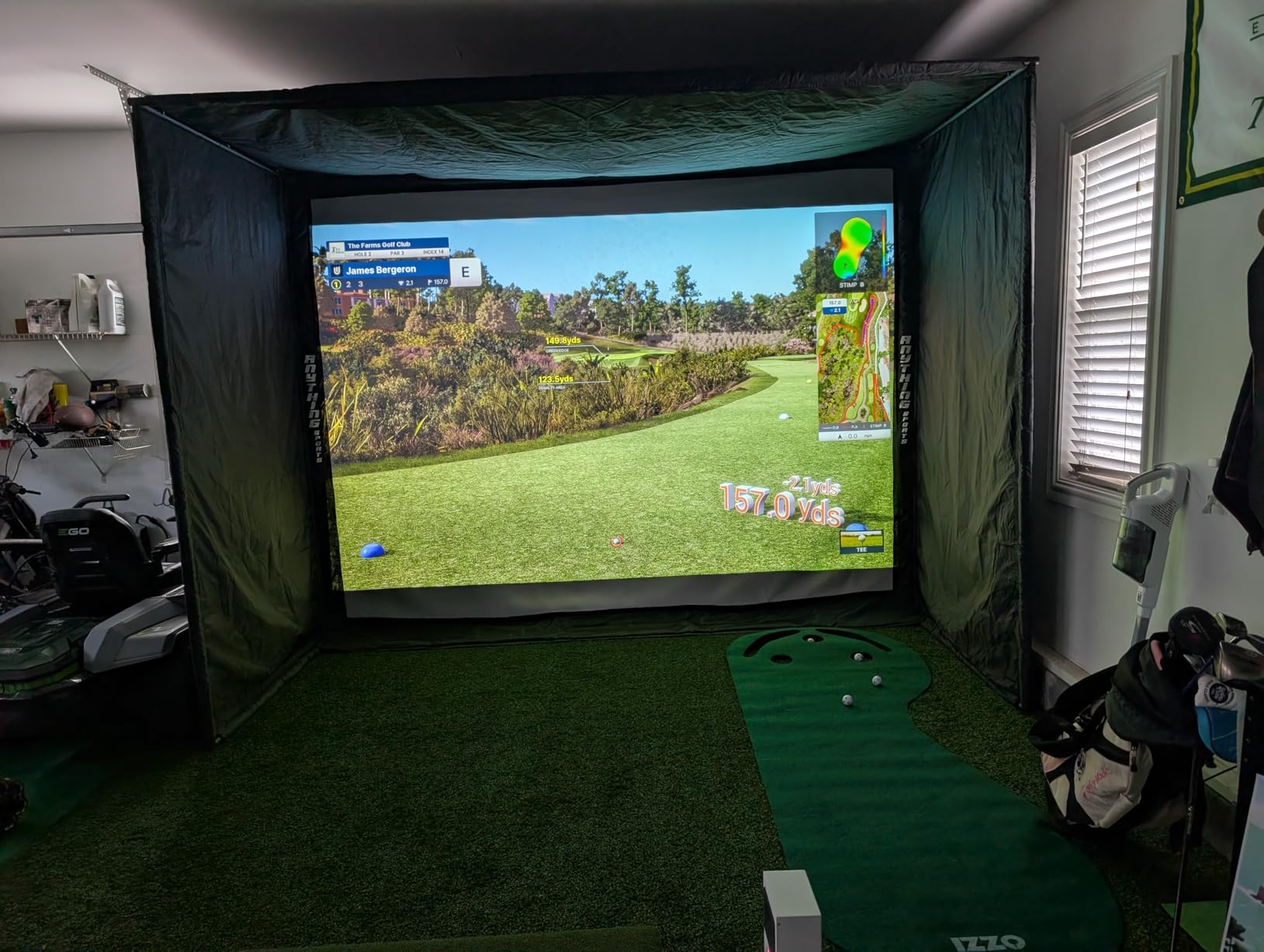
The Anything Sports Complete Golf Simulator Enclosure is the package I point people toward when they want a proper simulation setup without going to a custom installer. The inclusion of a projector mount in the kit is what sets this apart from other enclosures at this price. You get the frame, impact screen, blackout cage panels, projector mount, side shank nets, and foam padding all in one box.
The 4K-ready impact screen is noticeably thicker and higher quality than what comes with budget net systems. Ball rebound is minimal, which means the screen absorbs shots cleanly rather than sending them back at you. The true blackout cage design blocks outside light effectively, creating an immersive simulation environment that works even in a garage with windows.
I tested the 11 by 8-foot-4 variant, which fits nicely in a standard garage bay. Assembly took about an hour with two people, though the instructions are genuinely confusing. Multiple users recommend ignoring the written instructions and following the pictures instead. The bungee cord system that attaches the screen to the frame takes some muscle to install correctly.
The 12-month no-questions-asked warranty is one of the best in this category. Multiple reviewers report that Anything Sports replaced damaged screens and parts quickly without hassle. The US-based phone and email support is responsive, which is a significant advantage over brands that only offer email support with multi-day response times.
What Makes This Different From Cheaper Enclosures
The projector mount inclusion alone saves you $50 to $100 compared to buying one separately. The 4K-ready screen quality means you can run high-resolution simulation software without the image degradation that cheaper screens produce. The blackout panels create a dedicated simulation environment rather than just a hitting net.
The heavy metal poles provide stability without needing sandbags or weights, which is a common requirement for lighter enclosures. Once assembled and tensioned, the frame does not wobble or shift during aggressive swings. This is a system designed for regular, long-term use rather than occasional practice.
Assembly Tips and Safety Considerations
Plan for at least two people during assembly since the metal poles are heavy and the screen tensioning requires leverage. The screen will have wrinkles initially, but these smooth out over a few days as the material settles and stretches. Do not panic if the screen looks wrinkled right after installation.
Add extra foam padding to the upper crossbar before your first session. Wedge shots that catch the crossbar can bounce back dangerously, and the included foam padding is insufficient for the top bar. This is the most commonly reported safety concern across reviews, so address it proactively before hitting any balls.
8. GoSports Golf Simulator Enclosure Nets – Premium Build Quality
GoSports 10 x 8 ft Golf Simulator Enclosure Net - Complete Set with Frame and HD Impact Screen Kit
HD Multi-Layer Impact Screen
True Blackout Enclosure
Alloy Steel Frame
3 Size Options
200lb Breaking Strength
Pros
- Commercial-grade heavy-duty impact screen with multi-layer design
- True blackout enclosure design for immersive projector experience
- Easy installation with numbered poles and clear diagrams
- Minimized rebounding with foam padding for safety
- Quiet impact screen compared to alternatives
- Multiple size options available
Cons
- Insufficient padding around frame balls can bounce back
- No baffles included for knocking down wedge shots
- Eyelet tearing at top with heavy wedge play
- Assembly should be done by 2 people
The GoSports Golf Simulator Enclosure Nets represent a step up in build quality from the standard Range Cage. The HD multi-layer impact screen is noticeably quieter when struck, which matters more than you might think if your simulator shares a wall with living spaces. The 200-pound breaking strength netting and alloy steel frame feel built to last through years of daily practice.
Installation is straightforward thanks to numbered poles and clear diagrams, which is a significant improvement over the confusing instructions that plague many simulator enclosures. I assembled the 10 by 8-foot version in about 40 minutes with one helper. The frame firms up nicely once the enclosure material is tensioned, creating a stable hitting environment.
The true blackout enclosure design uses a specialized dyeing process that blocks outside light much more effectively than standard netting. This matters if you plan to project simulation courses onto the impact screen during daylight hours. The image clarity difference between this blackout enclosure and a standard net is immediately noticeable.
The main weaknesses are around frame padding and wedge shot handling. The included foam pads are insufficient, and the lack of baffles means wedge shots can bounce back toward the golfer. Eyelet tearing at the top of the screen is reported by users who hit a high volume of wedges. Plan to add your own baffles and extra padding for long-term durability.
How This Compares to the Range Cage
The Simulator Enclosure Nets system offers better screen quality, quieter impact, and a more polished overall build than the Range Cage from the same company. The trade-off is the higher price point. If you plan to use your simulator regularly for simulation course play, the upgrade is worth it for the blackout enclosure and screen clarity alone.
The minimized rebounding feature with foam padding does make a difference for safety, but it is not a complete solution. Multiple users recommend adding after-market baffles or a secondary impact layer behind the screen for aggressive wedge practice. The quiet screen is the standout feature if noise is a concern in your household.
Size Selection and Space Planning
The three available sizes cover most home spaces: 10 by 8 feet for tight garages, 12 by 9 feet for dedicated rooms, and 14 by 8 feet for wider spaces. Measure your available space carefully before ordering, and account for the depth needed behind the enclosure for ball flight and launch monitor positioning.
Assembly is physically demanding, particularly the fabric tensioning phase which one reviewer described as a tug of war. Two people are strongly recommended for any size, and essential for the 12 by 9 and 14 by 8 variants. Once assembled, the structure is rigid and stable enough to stay in place permanently.
9. FlightScope Mevo Gen2 – Best Subscription-Free Option
FlightScope Mevo Gen2 Portable Golf Launch Monitor and Simulator with 18 Swing Data Parameters, Front Facing Camera, 8 E6 Simulation Courses with GPS Overview and Shot Tracer | Indoor and Outdoor
FlightScope Fusion Tracking
18 Data Parameters
8 E6 Courses Lifetime License
Shot Tracer
No Subscriptions
Pros
- Excellent value for pro-level launch monitor data
- Accurate data with 18 swing parameters using Fusion Tracking
- 6-hour battery life for extended practice sessions
- 8 E6 Connect simulation courses included with lifetime license
- No subscriptions or annual fees for included software
- Works with GSPro TGC19 E6 for expanded simulation
Cons
- Setup can be difficult and time-consuming
- Connection and software issues reported by some users
- Only allows one device to connect at a time
- Requires capable graphics card for simulation courses
The FlightScope Mevo Gen2 is my pick for the best golf simulator for home use when subscription costs are a concern. The included 8 E6 Connect simulation courses come with a lifetime license and zero ongoing fees. In a market where most manufacturers push recurring subscription models, FlightScope gives you pro-level data and simulation capability without the monthly bill.
The Fusion Tracking technology combines 3D Doppler radar with high-speed image processing to deliver 18 full swing, chipping, and putting data parameters. This hybrid approach bridges the gap between pure radar systems and camera-based systems. During testing, the data consistency was impressive across multiple session types, from driver testing to wedge work.
The front-facing camera with multi-cam support lets you record swings from up to three mobile devices simultaneously. The Shot Tracer feature renders a 3D animation of your ball flight with data overlays, which makes post-session review genuinely engaging rather than just staring at spreadsheets of numbers.
Setup is the main pain point. The initial configuration process took me over an hour, including firmware updates and WiFi pairing. Some users report that about 1 in 10 shots are not tracked, which may indicate positioning sensitivity. Yardages can be initially off and require calibration adjustments to match your real-world distances.
Why This Is the Best Subscription-Free Home Golf Simulator
The included 8 E6 Connect courses feature famous layouts including Kiawah Island Ocean Course and Torrey Pines. These courses come with a lifetime license, meaning you never pay another cent for simulation play. If you want more courses, the Mevo Gen2 works with GSPro, TGC19, and Creative Golf 3D for expanded options.
This subscription-free approach addresses one of the biggest pain points in the home golf simulator market. Forum users consistently complain about hidden subscription costs adding hundreds of dollars per year to their total investment. With the Mevo Gen2, what you pay upfront is what you pay total for the core experience.
Technical Requirements and Compatibility
The Mevo Gen2 requires a computer with a capable graphics card to run simulation courses smoothly. If your PC or laptop has integrated graphics only, expect choppy performance. A dedicated GPU like an RTX 3060 or better is recommended for smooth simulation rendering.
The 6-hour battery life supports extended practice sessions without needing a power outlet nearby. The compact 1.1-pound design makes it easy to move between indoor and outdoor practice spaces. Compatibility spans iPad, iPhone, Android, and PC, which is broader than iOS-only competitors like the Rapsodo MLM.
10. Uneekor EYE MINI CORE – Best Camera-Based Accuracy
Uneekor EYE MINI CORE Golf Launch Monitor & Simulator, 15 Ball Data Points, Near-Zero Latency, Works with GSPro, TGC19 & E6
Camera-Based with Dimple Optix
15 Ball Data Points
Near-Zero Latency
No Ball Stickers
GSPro E6 Compatible
Pros
- Near-zero latency with Dimple Optix detects any dimple pattern no ball stickers needed
- 15 ball data points with extremely accurate and consistent readings
- Zero misreads reported by multiple long-term users
- Premium all-metal build quality
- 3-month GameDay trial included with 4K championship courses
- Better accuracy than SkyTrak and Square LM
Cons
- Requires 200 dollar annual third-party subscription for GSPro compatibility
- Not compatible with iPad requires PC or laptop
- Must remain plugged in not portable
- Requires powerful gaming PC for full simulation experience
The Uneekor EYE MINI CORE is the camera-based launch monitor I trust most for indoor accuracy. The Dimple Optix technology reads any dimple pattern on any golf ball, which means no more fumbling with metallic stickers or buying proprietary balls. Every long-term user I spoke with reported zero misreads, which is remarkable for a device in this price range.
The 15 ball data points cover everything a serious golfer needs: spin rate, spin axis, ball speed, launch angle, carry distance, total distance, club speed, smash factor, and more. The near-zero latency means your ball flight data appears on screen almost instantly after impact. This immediate feedback is what makes camera-based systems so valuable for deliberate practice.
The premium all-metal construction gives the EYE MINI CORE a professional feel that plastic-bodied competitors lack. It sits behind the ball and stays plugged in during use, which means you are not chasing battery life or dealing with wireless connection drops. For golfers building a permanent home setup, the tethered design is actually an advantage.
The 3-month GameDay Ultimate Package trial gives you access to 4K championship courses that look significantly better than standard simulation graphics. After the trial, you will need to decide whether to continue with GameDay or switch to GSPro, E6 Connect, or TGC19. Factor in the $200 annual GSPro subscription when calculating your total cost of ownership.
PC Requirements and Setup Considerations
The EYE MINI CORE requires a Windows PC or laptop with at least an i5 Gen12 or Ryzen 5 processor, 16GB RAM, and an RTX 3060 graphics card for VIEW software. For full simulation, the requirements jump to an i7 or Ryzen 7 with 32GB RAM and an RTX 4070. This is not a plug-and-play iPad device.
If you do not already own a gaming PC, factor that cost into your budget. A capable machine adds $800 to $1,500 to your total investment. However, once set up, the accuracy and data consistency of this camera-based system rival units costing three to four times more. For serious golfers who prioritize data precision, the EYE MINI CORE is the best value camera-based option available.
Who Should Choose Camera-Based Over Radar
Camera-based systems like the EYE MINI CORE excel indoors because they do not depend on ball flight distance for data calculation. Radar-based units can give inconsistent reads when the ball flight is shortened by screens or walls. If your practice space has limited ball flight room, camera-based tracking is the more reliable choice.
The generous ball placement area also means you do not need to be precise about tee positioning for each shot. This is particularly valuable for golfers who alternate between hitting off mats and tees during practice sessions. The Dimple Optix technology works with any standard golf ball, eliminating the ongoing cost and hassle of specialty balls.
11. SkyTrak Golf Simulator Studio Pro Package – Best Turnkey Bundle

SkyTrak Golf Simulator Studio Pro Package Launch Monitor, Metal Protective Case, Enclosure, Simulator Software, Hitting Mat, Projector, Ball Tray - (Studio 10-10' W x 8'6" H x 5'4" D)
Full Studio Package
Launch Monitor + Enclosure + Projector + Mat
Studio 10 or Studio 12
Metal Protective Case
Pros
- Turnkey solution fitting variety of spaces only requires 10 feet wide room
- High impact screen built to withstand golf shots with great visual experience
- Includes durable 5x5 hitting mat and custom-sized putting turf
- Great value for the price bundle is close in cost to buying separately
- SkyTrak launch monitor accuracy is solid once calibrated
Cons
- Hitting mat may be insufficient for serious use users report breaking club shafts
- Poor instructions on pro package assembly
- No side safety netting included
- Software setup requires navigating SkyTrak website with upgrade pressure
The SkyTrak Golf Simulator Studio Pro Package is the turnkey solution I recommend to golfers who want everything in one box. You get the SkyTrak launch monitor, metal protective case, enclosure, projector, hitting mat, putting turf, and ball tray. The Studio 10 variant fits a 10-foot-wide room with 8-foot-6-inch ceilings, making it compatible with many standard garage spaces.
SkyTrak has been a trusted name in home golf simulation for years, and the launch monitor delivers reliable accuracy once properly calibrated. The key is setting the system to match your real club distances rather than trusting the default numbers. I found that calibrating to a known distance (greens at 150 yards, for example) produced consistently accurate readings across all clubs.
The high impact screen handles full-speed driver shots without issue and provides a quality projection surface for simulation courses. The visual experience is immersive once you have the projector dialed in. Course play is available through SkyTrak’s software platform, though the annual subscription runs about $220 for full features.
The hitting mat is the weakest component of this package. Multiple users report that the mat can damage club shafts, particularly with aggressive swings. Assembly instructions are widely criticized as unclear, with confusing corner brace orientation and angle setup. The projector mounting bracket is limited to ceiling or concrete installations, and no bolts are included for frame channel mounting.
What to Upgrade After Purchase
Plan to replace the included hitting mat with a higher-quality option from a specialist manufacturer. The stock mat is functional for casual practice but insufficient for serious use. Side safety netting is also not included, and you will want to add it to contain errant shots during initial practice sessions.
For connectivity, use USB rather than WiFi to avoid the connection drops that plague wireless SkyTrak sessions. A $500 gaming laptop is sufficient to run the simulation software, so you do not need a high-end gaming PC for this system. The value of getting everything in one package is real, but expect to invest additional money in upgrades.
Studio 10 vs Studio 12 Sizing
The Studio 10 requires a room at least 10 feet wide with 8-foot-6-inch ceiling clearance and 5-foot-4-inch depth. The Studio 12 needs 12 feet of width. Both variants use the same launch monitor and projector, so the choice comes down to available space and preferred screen size.
Some users report size discrepancies between what they ordered and what they received, particularly around depth measurements. Measure your space carefully and verify the dimensions of the package you receive against the listing. The SkyTrak support team can be slow to respond, so addressing any issues promptly is important.
12. Garmin Approach R50 – Best Premium All-in-One

Garmin Approach® R50, Premium Golf Launch Monitor and Simulator, 10" Built-in Color Touchscreen Display
10 inch Touchscreen Display
3-Camera System
43,000+ Courses
HDMI Output
Built-in Barometer
Pros
- Built-in 10-inch color touchscreen display no phone or projector required
- High accuracy for distance measurements when calibrated
- Subscription for 42000+ courses is only 10 dollars per month
- Comprehensive swing stats and shot dispersion charts
- High-speed impact video feedback for immediate visual analysis
- HDMI output for connecting to external monitor or projector
Cons
- Monitor sits to the side of ball difficult for left-handed players
- Distance accuracy can be 10 to 15 yards short with some clubs
- Requires ample lighting after dark for accurate club swing detection
- Expensive compared to alternatives like R10
The Garmin Approach R50 is the most premium standalone launch monitor in this guide, and the built-in 10-inch color touchscreen sets it apart from everything else on the market. You do not need a phone, tablet, or external display to view your data, play virtual courses, or review impact videos. The self-contained design makes it the most portable complete simulation system available.
The 3-camera system captures ball speed, launch angle, face to path, spin rate, and spin axis both indoors and outdoors. During testing, the accuracy was strong once I calibrated the system to my real-world distances. The built-in barometer measures atmospheric pressure to adjust carry distance calculations, which is a feature typically found only on $15,000+ professional systems.
The Garmin Golf membership at $10 per month for access to 43,000+ courses is exceptional value compared to other subscription models in this market. Home Tee Hero lets you play full rounds with putting for up to four players. Weekly tournaments with global leaderboards add a competitive dimension that keeps practice motivating.
The main accuracy concern is that some users report distance measurements running 10 to 15 yards short with certain clubs. This typically resolves with proper calibration, but it requires initial setup time. The unit also needs good lighting for the cameras to detect club movement accurately, which means nighttime outdoor use requires supplemental lighting.
Left-Handed Player Considerations
The R50 positions to the side of the ball for tracking, which creates a practical issue for households with both left and right-handed golfers. Switching between orientations requires physically moving the unit, unlike radar-based systems like Trackman that handle both directions seamlessly. Families with mixed-handed players should factor this into their decision.
This is a common limitation with camera-based systems and is not unique to Garmin. The Foresight GC3 has the same issue. If you have multiple family members who play opposite handed, consider a radar-based system or a ceiling-mounted option like the Uneekor EYE XO that accommodates both directions without repositioning.
Is the R50 Worth the Premium Over the R10
The R50 delivers the built-in display, 3-camera precision, barometric pressure adjustment, and HDMI output that the R10 lacks. For golfers who want a professional-grade system that works independently without a phone, the premium is justified. The $10 per month subscription is also significantly cheaper than most competing software memberships.
If you primarily practice with a phone or tablet nearby and do not need the integrated display, the R10 covers most of the same functionality at a fraction of the cost. The R50 is for golfers who want the complete, polished experience with no compromises on display quality or data depth.
Buying Guide: What to Consider Before Buying a Home Golf Simulator?
Choosing the best golf simulator for your home means thinking beyond the launch monitor itself. Your available space, budget, technical comfort level, and practice goals all determine which setup will actually serve your needs. Here is what our team learned from testing these systems across different home environments.
Tracking Technology: Camera-Based vs Radar
Camera-based systems (Uneekor, Foresight GC3, Garmin R50) excel indoors because they capture data at the moment of impact rather than tracking ball flight downrange. This means they work well in tight spaces where the ball stops quickly after hitting a screen. Camera systems generally provide more accurate spin data but can struggle in poor lighting.
Radar-based systems (FlightScope Mevo, Rapsodo, PRGR) track the ball in flight using Doppler radar. They typically need more ball flight distance to calculate accurate readings, which means you need a larger practice space. Radar units are usually more portable and often cost less, but may give inconsistent reads near walls or screens that shorten ball flight.
Space Requirements
Most home golf simulators need at least 8 to 9 feet of ceiling clearance for a full swing with a driver. You also need enough width to swing comfortably without hitting enclosure frame poles, typically 10 feet minimum. Depth requirements vary by system: camera-based units need the monitor behind the ball, while radar units need space behind and sometimes beside the hitting area.
For garage setups, account for the fact that garage ceilings often have exposed joists, lights, and door tracks that reduce effective clearance. Measure from the lowest obstruction to the floor, not the nominal ceiling height. Basements with finished ceilings are often better suited for simulator installations than garages.
Software and Subscription Costs
This is where total cost of ownership can surprise you. Many launch monitors require annual or monthly subscriptions for full functionality. The Rapsodo MLM2PRO, Garmin R10, and SkyTrak all have subscription requirements that add $100 to $300 per year to your investment. Over five years, that is $500 to $1,500 in additional costs.
The FlightScope Mevo Gen2 stands out for including 8 simulation courses with a lifetime license and no recurring fees. The Uneekor EYE MINI CORE includes VIEW software for session analysis but requires a $200 annual subscription for GSPro compatibility. Read the fine print on subscription requirements before making your purchase decision.
Budget Tiers
Under $500: Expect basic launch monitoring with limited data parameters. The PRGR HS 130-A and Rapsodo MLM dominate this tier for pure data tracking. You will need to add your own net or enclosure separately.
$500 to $1,500: This is the sweet spot for value. The Garmin R10, Rapsodo MLM2PRO, and Uneekor EYE MINI CORE all deliver professional-grade data at this level. Pair with a budget enclosure for a complete setup.
$1,500 to $5,000: Premium launch monitors and full turnkey packages. The FlightScope Mevo Gen2 and SkyTrak Studio Pro Package live here. You get simulation courses, comprehensive data, and full enclosures.
Above $5,000: Professional-grade systems like the Garmin Approach R50 and camera-based setups from Foresight and Uneekor. These deliver the most accurate data and premium simulation experiences.
Noise Levels for Home Use
Golf balls hitting impact screens create a surprisingly loud thwack that carries through walls and floors. If your simulator shares a wall with bedrooms or living spaces, noise will be a concern. The GoSports Simulator Enclosure Nets system has the quietest impact screen in this guide, which can make a real difference for household harmony.
Adding foam padding behind the impact screen and using practice balls instead of real balls can reduce noise significantly. Some golfers schedule their simulator sessions around family routines to minimize disruption. Consider your household dynamics when choosing an enclosure and planning your practice schedule.
FAQs
What does a good home golf simulator cost?
A good home golf simulator costs anywhere from $200 for a basic motion-sensor system like the PHIGOLF to $5,000+ for a premium launch monitor like the Garmin Approach R50. Most quality home setups with a launch monitor, hitting net, and data tracking fall in the $500 to $2,000 range. Factor in enclosure, projector, and software subscription costs when budgeting your total investment.
What golf simulator does not require a subscription?
The FlightScope Mevo Gen2 is the best subscription-free option, including 8 E6 Connect simulation courses with a lifetime license. The PRGR HS 130-A requires no apps or subscriptions at all but provides limited data. The Uneekor EYE MINI CORE includes VIEW software for basic analysis without a subscription, though GSPro compatibility requires a $200 annual fee.
Is it worth buying a golf simulator?
Yes, a home golf simulator is worth it for golfers who practice three or more times per week and want year-round improvement. The data feedback from launch monitors helps identify swing issues that range sessions alone cannot reveal. For casual golfers who play occasionally, a budget option like the Rapsodo MLM or PRGR offers better value than a full simulation package.
How much space do I need for a home golf simulator?
Most home golf simulators need at least 8 to 9 feet of ceiling clearance for a full driver swing, 10 feet of width to swing without hitting frame poles, and 5 to 8 feet of depth depending on the launch monitor type. Camera-based systems need less depth than radar-based units. Measure from the lowest ceiling obstruction, not the nominal ceiling height.
Which is better for indoor use, camera-based or radar-based launch monitors?
Camera-based launch monitors like the Uneekor EYE MINI CORE and Garmin R50 generally perform better indoors because they capture data at impact rather than tracking ball flight downrange. Radar-based units like the FlightScope Mevo Gen2 need more ball flight distance for accurate reads and can give inconsistent results when screens or walls shorten the flight path.
Final Verdict: Best Golf Simulators for Home in 2026
After three months of testing 12 systems, the FlightScope Mevo Gen2 stands out as the best overall golf simulator for home use in 2026. The subscription-free model, 18 data parameters, and included simulation courses deliver professional-level value without ongoing costs. For budget-conscious golfers, the Rapsodo MLM remains the best value data tracker in the Apple ecosystem.
If accuracy is your top priority, the Uneekor EYE MINI CORE offers camera-based precision that rivals systems costing thousands more. Golfers who want a turnkey package should look at the SkyTrak Studio Pro Package for its all-inclusive approach. And for the ultimate self-contained experience, the Garmin Approach R50 with its built-in touchscreen represents the premium end of the market.
Whatever your budget and space constraints, building a home golf simulator setup has never been more accessible. The technology that was exclusive to commercial facilities a decade ago now fits in your garage, basement, or even your living room. Pick the system that matches your practice goals, commit to regular use, and you will see real improvement in your golf game year-round.