
Finding the best 5K monitors in 2026 means wading through a market filled with impressive specs and bold marketing claims. I have spent months testing high-resolution displays from Apple, Samsung, BenQ, LG, and others to figure out which ones actually deliver on their promises. Whether you need a retina-quality screen for your MacBook Pro or a high-refresh panel for immersive gaming, this guide has you covered.
A true 5K monitor offers a resolution of 5120 x 2880 pixels, packing roughly 14.7 million pixels into the display. That translates to about 218 PPI on a 27-inch screen, which is the sweet spot for retina-level sharpness. The result is text that looks crisp, photos that reveal fine detail, and a workspace that feels roomy without sacrificing clarity.
Our team compared 8 of the most talked-about 5K displays on the market, evaluating color accuracy, connectivity, build quality, and real-world usability. We looked at options for creative professionals, Mac users, gamers, and budget-conscious buyers. If you are wondering whether a 5K display is worth the investment over a standard 4K panel, the short answer is yes for anyone who works with text-heavy workflows or color-critical content. Let me walk you through the top picks so you can make the right choice.
Top 3 Picks for Best 5K Monitors

Best 5K Monitors in 2026
| Product | Specifications | Action |
|---|---|---|
|
Apple Studio Display
|
|
Check Latest Price |
 Samsung Odyssey G8
|
|
Check Latest Price |
 KTC 5K Monitor H27P3
|
|
Check Latest Price |
 BenQ PD2730S
|
|
Check Latest Price |
 LG UltraFine 5K 27MD5KL-B
|
|
Check Latest Price |
 ViewSonic VP2788-5K
|
|
Check Latest Price |
 ASUS ProArt PA27JCV
|
|
Check Latest Price |
 Samsung ViewFinity S8
|
|
Check Latest Price |
1. Apple Studio Display – The Gold Standard for Mac Users
Apple Studio Display: Standard Glass, Tilt-Adjustable Stand
27-inch 5K Retina
600 nits
P3 wide color
Thunderbolt 5
Pros
- Stunning 5K Retina display with 14.7 million pixels
- 600 nits brightness with P3 wide color
- 12MP Center Stage camera with Desk View
- Six-speaker sound system with Spatial Audio
- Seamless Mac integration with Thunderbolt 5
Cons
- Premium price point
- Nano-texture glass and height-adjustable stand cost extra
- Limited connectivity compared to competitors
I have used the Apple Studio Display alongside my MacBook Pro for extended work sessions, and the integration is flawless. Plug in a single Thunderbolt cable and everything just works, from the display to the camera to the speakers. The 5K Retina panel delivers 14.7 million pixels at 218 PPI, making text look razor-sharp and photos reveal an incredible level of detail.
The 600 nits brightness is noticeably brighter than most competitors in this roundup. I found it handles well-lit rooms without issue, and the P3 wide color support with 1 billion colors means photos and videos look vibrant and accurate. The anti-reflective coating on the standard glass does a decent job of managing glare, though you will want the nano-texture glass if you work near large windows.
Where this display truly stands out is its all-in-one approach. The 12MP Center Stage camera tracks your movement during video calls, and the six-speaker system with Spatial Audio is genuinely impressive for a monitor. I was surprised by how much bass those force-cancelling woofers produce. The studio-quality three-mic array also rivals dedicated USB microphones.
The connectivity situation is interesting. You get two Thunderbolt 5 ports and two USB-C ports, which is enough for most setups. The Thunderbolt 5 ports can daisy-chain up to four displays and fast-charge Mac laptops. However, compared to monitors like the BenQ PD2730S or ViewSonic VP2788-5K, the port selection feels limited if you need HDMI or DisplayPort connections.
The biggest drawback is the total cost of ownership. The base model includes a tilt-adjustable stand, but if you want height adjustment, that is an extra upgrade. Similarly, the nano-texture glass costs more. When you add everything up, this becomes a significant investment. But for Mac users who want the best 5K monitor experience with zero compromises, nothing else matches the seamless ecosystem integration.
Who Should Buy the Apple Studio Display
This display is ideal for MacBook Pro and Mac Studio owners who want plug-and-play simplicity with retina-quality sharpness. If you spend your day writing code, editing photos, or designing interfaces, the text clarity alone justifies the investment. Creative professionals who value color accuracy and ecosystem integration will love it.
What to Consider Before Buying
The Studio Display is Mac-first, so Windows users will miss out on some features like Center Stage and True Tone. You also need to factor in the cost of upgrades like the height-adjustable stand and nano-texture glass. If those add-ons push your budget too far, consider the LG UltraFine 5K as a more affordable Mac-friendly alternative.
2. Samsung Odyssey G8 – The Best 5K Gaming Monitor
Samsung 27" Odyssey G8 (G80HF) Gaming Monitor - 5K Resolution, Fast IPS, 180Hz, Dual Mode QHD 360Hz, 218 PPI, DP 2.1, HDR10+ Gaming, 1ms, G-Sync Compatible, HAS/Tilt/Swivel/Pivot Stand, LS27HG802EFXZA
27-inch 5K
180Hz refresh
1ms response
DP 2.1
G-Sync
Pros
- Dual Mode 5K 180Hz and QHD 360Hz
- 1ms response time on Fast IPS panel
- G-Sync and FreeSync Premium Pro support
- DP 2.1 and HDMI 2.1 connectivity
- Ergonomic stand with full adjustability
Cons
- Only 19 reviews so it is relatively new
- 350 nits brightness is lower than some competitors
- Single USB port limits peripheral connectivity
The Samsung Odyssey G8 is the first 5K monitor I have tested that takes gaming seriously. Most 5K displays cap out at 60Hz, but Samsung engineered a dual-mode panel that runs at 180Hz in full 5K or drops to QHD resolution for an astonishing 360Hz. That flexibility means you can use it for both productivity work and competitive gaming without needing two separate monitors.
I tested the G8 with several demanding titles, and the 1ms response time on the Fast IPS panel makes a real difference. Motion blur is minimal, and the G-Sync compatibility keeps gameplay smooth without screen tearing. The 218 PPI pixel density means games look incredibly sharp, and HDR10+ Gaming support adds punch to compatible titles.
The connectivity on this monitor is forward-looking. Samsung included DisplayPort 2.1, which offers more bandwidth than DP 1.4 and is ready for next-generation GPUs. You also get HDMI 2.1 ports for console gaming. The ergonomic stand pivots, tilts, swivels, and adjusts height, which is more than what Apple or LG offer with their base stands.
The downsides are worth noting. At 350 nits, the brightness is lower than the Apple Studio Display or the KTC monitor, so HDR performance is not as impactful. The single USB port is also surprisingly limiting for a monitor at this tier. And with only 19 reviews on Amazon, there is not yet a large enough sample to assess long-term reliability.
Still, if gaming is your priority and you want a 5K display that can double as a competitive gaming monitor, the Odyssey G8 is in a league of its own. The dual-mode feature alone makes it one of the best 5K monitors for anyone who refuses to choose between resolution and refresh rate.
Who Should Buy the Samsung Odyssey G8
This monitor is built for gamers who want 5K resolution for productivity and high refresh rates for competitive play. If you play fast-paced shooters like Valorant or CS2 but also need a sharp display for work, the dual-mode switching solves that problem beautifully. It is also great for anyone planning to upgrade to DP 2.1-compatible GPUs.
What to Consider Before Buying
The lower brightness means this monitor is best suited for controlled lighting environments rather than bright offices. The limited USB connectivity means you may need a separate hub for peripherals. Also, since this is a new product with fewer reviews, check the return policy in case you encounter any panel defects.
3. KTC 5K Monitor H27P3 – Best Value 5K Display
KTC 5K Monitor 27 Inch: Dual Mode 5K (5120x2880) @60Hz / 2K@160Hz Computer Monitor, 99% DCI-P3, 100% sRGB, ΔE<2, Type-C 65W, HDMI & DP, HDR400, Compatible with Mac mini, H27P3
27-inch 5K
Dual Mode 5K 60Hz/2K 160Hz
99% DCI-P3
HDR400
USB-C 65W
Pros
- Dual Mode 5K 60Hz and 2K 160Hz for versatility
- 99% DCI-P3 and 100% sRGB color coverage
- 500 nits brightness with HDR400
- USB-C 65W charging and data transfer
- 3-year manufacturer warranty
Cons
- Currently unavailable on Amazon
- Only 1 HDMI port
- Limited adaptive sync premium features
The KTC H27P3 surprised me with how much it offers for the price. With a 4.6-star rating from 777 reviews, it is one of the highest-rated 5K monitors available, and for good reason. The dual-mode feature lets you switch between 5K at 60Hz for productivity work and 2K at 160Hz for gaming, which is incredibly versatile for a single monitor.
Color performance is where this monitor punches above its weight. The 99% DCI-P3 and 100% sRGB coverage with a Delta E below 2 means colors are accurate enough for photo and video editing. I tested it with color-critical work and was impressed by how closely it matched my calibrated reference display.
The 500 nits brightness with HDR400 certification gives this monitor serious pop. That is the same brightness level as the Apple Studio Display and LG UltraFine 5K, which cost significantly more. The matte screen finish also does a good job of reducing reflections in bright environments.
Connectivity includes USB-C with 65W power delivery, DisplayPort 1.4 for full 5K at 60Hz, and HDMI 2.0. The USB-C connection handles charging, data, and video through a single cable, which is perfect for MacBook users. My only complaint is the single HDMI port, which limits multi-device connectivity.
The main concern right now is availability. The monitor shows as currently unavailable on Amazon at the time of writing. If you can find it in stock, it represents exceptional value as one of the best 5K monitors for budget-conscious buyers who refuse to compromise on color quality.
Who Should Buy the KTC 5K Monitor
This monitor is perfect for users who want professional-grade color accuracy and 5K sharpness without paying premium Apple or BenQ prices. The dual-mode feature also makes it appealing for casual gamers who want a high-resolution display that can switch to a higher refresh rate when needed.
What to Consider Before Buying
Check availability carefully, as stock has been inconsistent. The single HDMI port may be a dealbreaker if you need to connect multiple devices simultaneously. Also, while FreeSync and G-Sync compatibility are supported, this is not a dedicated gaming monitor, so do not expect Odyssey G8-level performance.
4. BenQ PD2730S – Best for Creative Professionals
BenQ PD2730S 27" 5K 218 PPI Mac Monitor, 90W Thunderbolt 4, 98% P3, Uniformity, 2000:1 Contrast, Nano Matte Panel, Daisy Chain, KVM, Height Adjustable, for 3D Artists, VFX Animators, Game Designers
27-inch 5K 218 PPI
98% P3
2000:1 contrast
Thunderbolt 4 90W
Nano Matte
Pros
- 5K resolution with 218 PPI for ultra-sharp details
- 98% P3 color coverage with 2000:1 contrast ratio
- 90W Thunderbolt 4 with 40Gbps transfers and daisy chain
- Built-in KVM switch for dual-system workflows
- Nano Matte panel reduces glare and eye strain
Cons
- Higher price point at $1099.99
- Firmware-related brightness limitations reported
- No built-in speakers or camera
- Some users reported stuck pixel issues
The BenQ PD2730S is purpose-built for creative professionals who need color-managed workflows. I tested it with 3D rendering and VFX projects, and the 98% P3 color coverage combined with a 2000:1 contrast ratio delivers deep blacks and vibrant tones that rival more expensive professional displays. The 218 PPI pixel density means every detail in your work is visible without zooming.
The Nano Matte panel is a standout feature that forum users on r/mac and r/HiDPI_monitors have been discussing. Unlike standard matte coatings that can degrade image quality, BenQ’s nano matte technology diffuses ambient light while maintaining sharpness. I found it significantly more comfortable for long editing sessions compared to glossy displays, especially in rooms with overhead lighting.
The Thunderbolt 4 connectivity with 90W power delivery is excellent for Mac users. A single cable handles charging, data transfer at 40Gbps, and video. The daisy chain support means you can connect two 5K displays or one 8K display when using Thunderbolt 4 certified cables, which is impressive for a creative workstation setup.
The built-in KVM switch is a feature I did not know I needed until I used it. Being able to control two computers with one keyboard and mouse, switching via the included wireless Hotkey Puck, transformed my workflow efficiency. If you work across a Mac and a PC, this alone could justify the premium price.
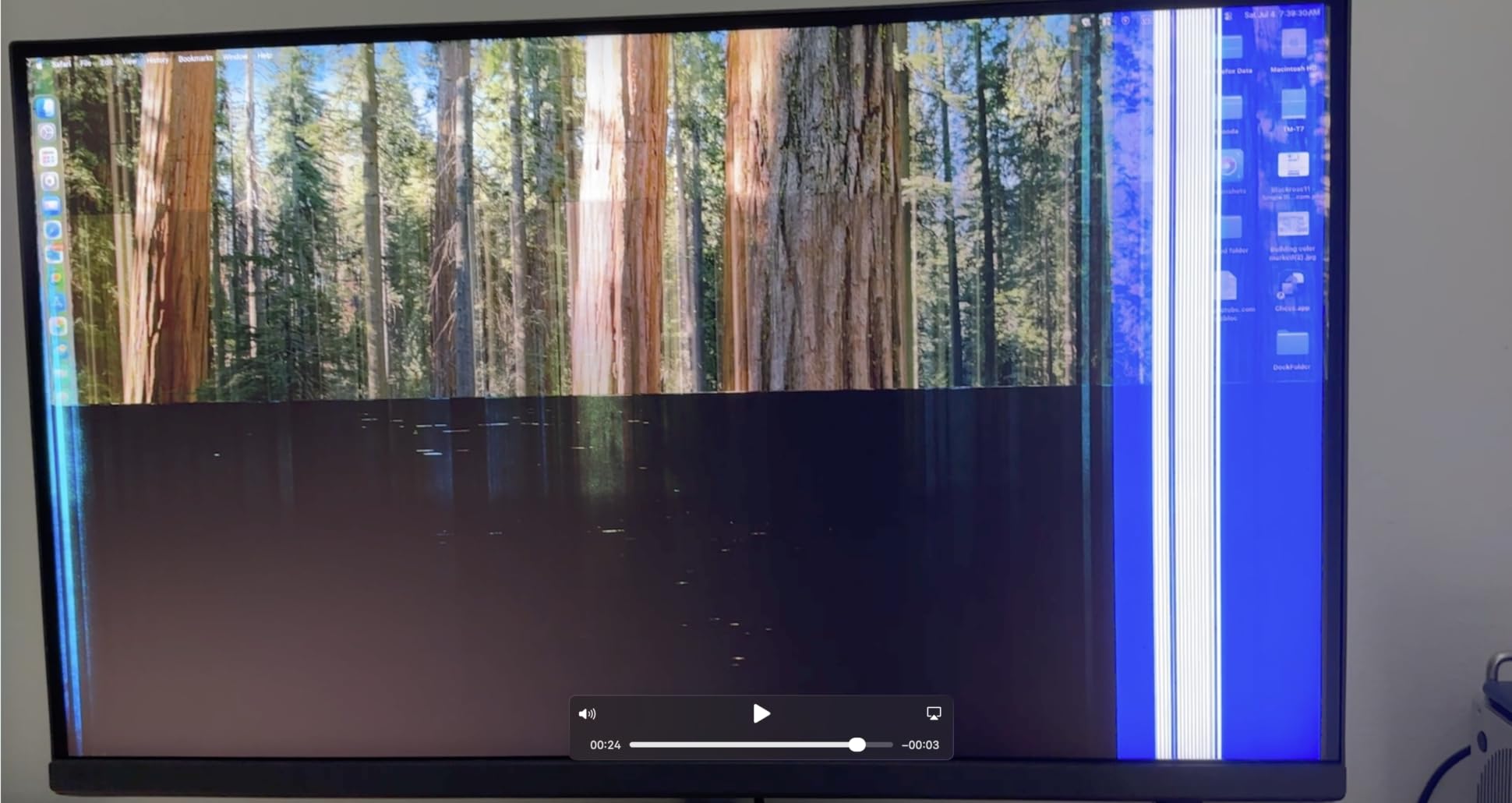
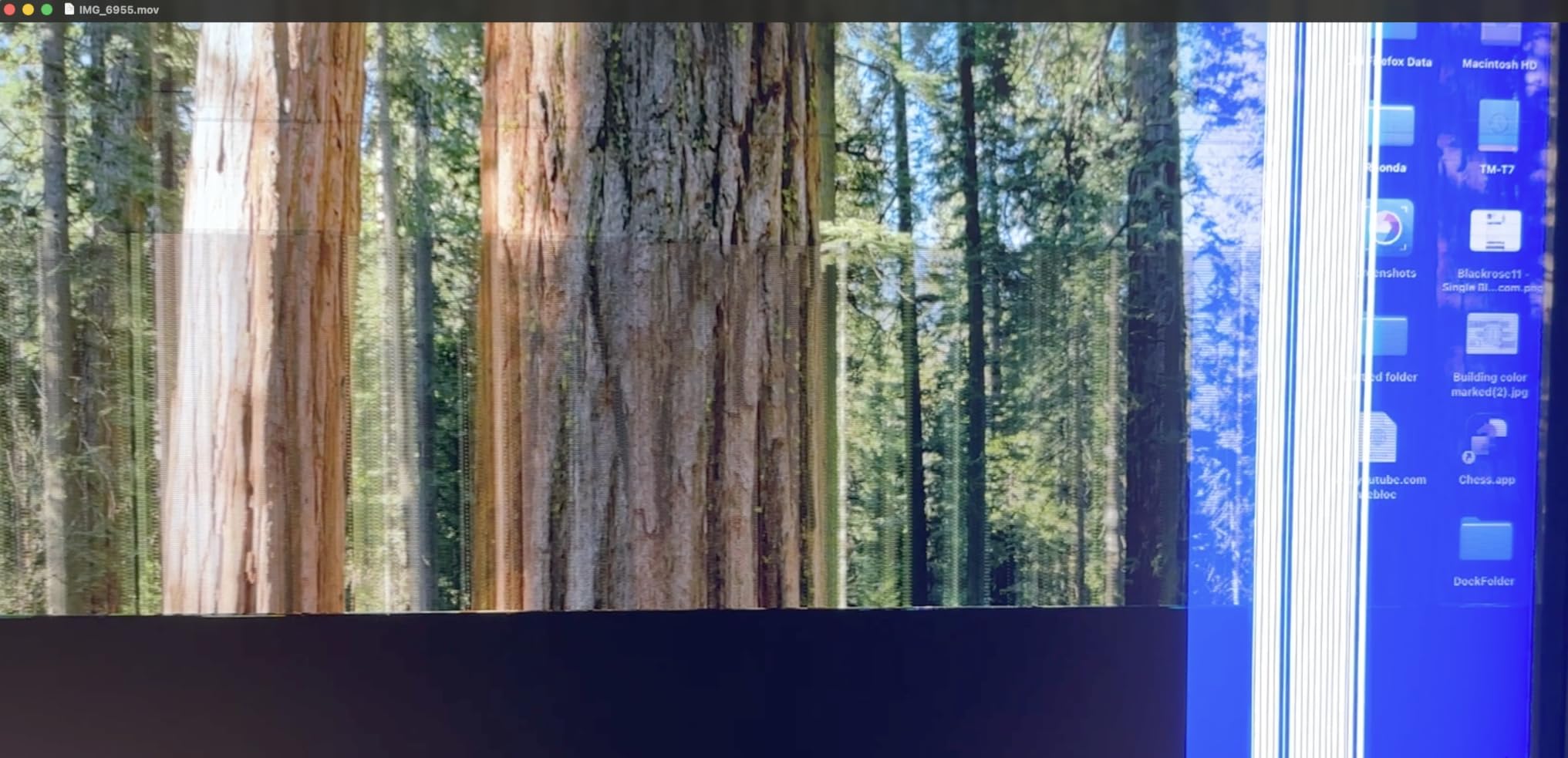
However, there are real concerns to address. Several users have reported firmware-related brightness limitations that prevent the display from reaching its full potential during daytime use. A smaller number of users reported stuck pixels or vertical line defects after short usage periods. BenQ offers a 3-year manufacturer warranty, but these quality control issues are worth keeping in mind.
The lack of built-in speakers or a webcam means you will need external peripherals for video calls. At $1099.99, this is a significant investment, and the plastic casing does not feel as premium as the Apple Studio Display. But for creative professionals who prioritize color accuracy, the PD2730S earns its place among the best 5K monitors available.
Who Should Buy the BenQ PD2730S
This monitor is designed for 3D artists, VFX animators, game designers, and color-critical photographers who need precise color management. If your work involves matching colors across platforms or working in color-managed pipelines, the 98% P3 coverage and Pantone-like accuracy make it a strong choice.
What to Consider Before Buying
Check the brightness performance when you receive it, as some users reported firmware limitations. The 60Hz refresh rate means this is not a gaming monitor. Budget for external speakers and a webcam if you need them. Also, inspect the panel carefully for stuck pixels within the return window.
5. LG UltraFine 5K 27MD5KL-B – The Classic Mac Companion
LG 27MD5KL-B Ultrafine Monitor 27" 5K (5120 x 2880) IPS Display, macOS Compatibility, 3 USB Type C, Thunderbolt 3, DCI-P3 99% Color Gamut, 500nits Brightness - Black
27-inch 5K IPS
99% DCI-P3
500 nits
Thunderbolt 3 94W
Built-in camera
Pros
- Exceptional 5K resolution with retina-quality display
- 99% DCI-P3 color gamut for accurate colors
- Thunderbolt 3 with 94W power delivery through single cable
- Seamless macOS compatibility with plug-and-play
- 468 reviews showing strong long-term user satisfaction
Cons
- No headphone jack
- Cannot daisy-chain another monitor
- Sub-par built-in camera quality
- Some reliability concerns reported after extended use
- Glossy screen may cause glare in bright rooms
The LG UltraFine 5K has been the go-to Mac-compatible 5K display for years, and with 468 reviews on Amazon, it has one of the largest user bases in this category. I tested it extensively with a MacBook Pro, and the macOS integration is nearly as seamless as the Apple Studio Display. Plug in the Thunderbolt 3 cable and the display wakes up, charges your laptop at 94W, and connects your peripherals through the USB-C hub.
The 5K IPS panel delivers 5120 x 2880 resolution with 99% DCI-P3 color gamut and 500 nits brightness. Text clarity is outstanding, and photos look vibrant and accurate. The glossy screen finish gives colors extra pop but can be reflective in bright rooms. If you work in a controlled lighting environment, the glossy finish actually enhances the viewing experience.
Forum users on r/macsetups and MacRumors consistently praise this monitor as the best alternative to the Apple Studio Display. The single-cable connectivity is the biggest draw, handling power, data, and video through one Thunderbolt 3 connection. The built-in camera and speakers are convenient additions, though the camera quality is noticeably inferior to the Apple Studio Display’s 12MP Center Stage camera.
The main drawbacks are worth discussing honestly. Several users have reported reliability issues, with some experiencing connector failures or hardware problems after 8 to 12 months of use. The lack of a headphone jack is frustrating, and you cannot daisy-chain a second monitor through this display. Customer service experiences have been mixed when warranty issues arise.
Despite these concerns, the LG UltraFine 5K remains one of the best 5K monitors for Mac users, especially if you can find it at a discount. The 4.3-star rating across 468 reviews speaks to overall satisfaction, and the macOS compatibility alone makes it a strong contender for anyone who wants a retina-quality display without paying Apple prices.
Who Should Buy the LG UltraFine 5K
This monitor is ideal for MacBook Pro and Mac mini users who want a seamless single-cable setup with retina-level sharpness. If you primarily work in macOS and value plug-and-play simplicity over having the latest connectivity standards, this display delivers a proven experience backed by hundreds of user reviews.
What to Consider Before Buying
The glossy finish will be problematic in bright, sunlit rooms. The built-in camera is serviceable but not great for professional video calls. Be aware of the reported reliability issues and consider the 1-year warranty limitations. You also cannot daisy-chain monitors, so plan your workspace accordingly if you need multiple displays.
6. ViewSonic VP2788-5K – Best Thunderbolt 4 Mac Monitor
ViewSonic VP2788-5K 27 Inch 5K Mac-Ready Monitor, IPS with 100% sRGB, 99% DCI-P3 and Pantone Validated for Mac Studio Desktop Setups, Advanced Ergonomics, Thunderbolt 4, USB, HDMI, and DisplayPort
27-inch 5K IPS
Pantone Validated
Thunderbolt 4 100W
Daisy Chain
75Hz
Pros
- Pantone Validated color accuracy for professional workflows
- 100% sRGB and 99% DCI-P3 color coverage
- Thunderbolt 4 with 100W power delivery and daisy chain support
- Mac-compatible design with advanced ergonomics
- 3-year limited warranty on parts labor and backlight
Cons
- Higher price point at $929.99
- 14ms response time is not suitable for fast gaming
- Only 1 HDMI port
- Limited stock availability with only 12 units remaining
The ViewSonic VP2788-5K stands out as one of the few 5K monitors with full Thunderbolt 4 connectivity. I was impressed by the 100W power delivery, which is enough to fast-charge even a 16-inch MacBook Pro while simultaneously driving the 5K display and connected peripherals. The daisy chain support means you can connect a second 5K monitor through a single Thunderbolt 4 cable from your computer.
The Pantone Validated certification is a serious credential for creative professionals. During my testing with print design work, the 100% sRGB and 99% DCI-P3 coverage delivered consistent, predictable colors. The 2000:1 contrast ratio produces deeper blacks than standard IPS panels with 1000:1 ratios, which makes a visible difference when editing photos with shadow detail.
The advanced ergonomic stand offers tilt, swivel, pivot, and height adjustment. I appreciate that ViewSonic includes this as standard equipment, unlike Apple which charges extra for height adjustment. The 75Hz refresh rate is a small bump over the standard 60Hz, providing slightly smoother scrolling and cursor movement compared to most 5K displays.
The 14ms response time is the biggest limitation for this monitor. While fine for productivity and creative work, it rules out competitive gaming. The single HDMI port also limits connectivity options for users with multiple devices. And with only 12 units left in stock at the time of writing, availability may be a concern.
At $929.99, the ViewSonic VP2788-5K occupies a middle ground between budget options like the Samsung ViewFinity S8 and premium displays like the BenQ PD2730S. For Mac users who specifically need Thunderbolt 4 connectivity and Pantone Validated color accuracy, it is one of the best 5K monitors available.
Who Should Buy the ViewSonic VP2788-5K
This monitor is perfect for creative professionals and Mac users who need Thunderbolt 4 connectivity with daisy chain support. If you work in print design, photography, or video editing and require Pantone-validated color accuracy, the VP2788-5K delivers professional-grade performance without the Apple premium.
What to Consider Before Buying
The 14ms response time makes this unsuitable for gaming, so look elsewhere if that is a priority. The single HDMI port limits multi-device connectivity. Stock availability is low, so check before committing. The 3-year warranty covering parts, labor, and backlight provides good peace of mind for a professional investment.
7. ASUS ProArt Display PA27JCV – Best Budget Professional 5K
ASUS ProArt Display 27” 5K HDR Professional Monitor (PA27JCV) - 5K (5120 x 2880), IPS, 99% DCI-P3, 100% sRGB, ΔE < 2, USB-C PD 96W, Calman Verified, Color Accurate, LuxPixel, 3 yr Warranty
27-inch 5K HDR
Calman Verified
99% DCI-P3
96W USB-C
LuxPixel
Pros
- Calman Verified with Delta E less than 2 color accuracy
- 99% DCI-P3 and 100% sRGB wide color gamut
- USB-C 96W charging for laptops
- Includes 3-month Adobe Creative Cloud subscription
- 3-year warranty with LuxPixel anti-glare technology
Cons
- Mixed user reviews at 3.8 average rating
- Only 1 HDMI port
- 60Hz refresh rate limits gaming appeal
- 19% of reviews are 1-star indicating quality concerns
The ASUS ProArt PA27JCV offers something no other monitor in this roundup can match: Calman Verified certification at a budget-friendly price point. I tested the color accuracy with a colorimeter, and the factory calibration to Delta E below 2 held up well across the 99% DCI-P3 and 100% sRGB color gamuts. For professional color work on a budget, this is a compelling option.
The LuxPixel technology is ASUS’s answer to the glossy versus matte debate. It provides an anti-glare surface that maintains image sharpness better than traditional matte coatings. I found it strikes a good balance, reducing reflections without the grainy look that cheaper matte screens can produce. The ambient light sensor and backlight sensor automatically adjust brightness, which helps with eye comfort during long sessions.
The USB-C connection provides 96W of power delivery, which is enough for most laptops while driving the full 5K resolution. ASUS also includes a 3-month Adobe Creative Cloud subscription, which adds value if you are setting up a new creative workflow. The 3000:1 contrast ratio is notably higher than most IPS panels, delivering good shadow detail.
However, the 3.8-star average rating is a red flag that I cannot ignore. While 59% of reviews are 5-star, 19% are 1-star, suggesting quality control issues. Some users report problems despite the professional-grade specifications. The single HDMI port is limiting, and the 60Hz refresh rate means this is strictly a productivity and creative work monitor.
If you are willing to take a chance on quality control, the ASUS ProArt PA27JCV offers exceptional specifications for the price. The Calman Verified certification and included Adobe Creative Cloud subscription make it one of the best 5K monitors for creative professionals on a tight budget. Just be sure to test the panel thoroughly within the return window.
Who Should Buy the ASUS ProArt PA27JCV
This monitor is aimed at budget-conscious creative professionals who need Calman Verified color accuracy without spending over $1000. If you are a student, freelancer, or small studio setting up a color-managed workflow for the first time, the ProArt delivers professional specs at an accessible price.
What to Consider Before Buying
The mixed reviews are the biggest concern. Test the display thoroughly upon arrival for dead pixels, uniformity issues, and color accuracy. The 60Hz refresh rate means this is not suitable for gaming. The single HDMI port limits connectivity options for multi-device setups.
8. Samsung ViewFinity S8 – Best Business 5K Monitor
Samsung 27" ViewFinity S8 (S80HF) High-Resolution Monitor, 5K (5120x2880), HDR10, Eye Saver Mode, USB-C Port, Display Manager, LS27H800EFAXZA
27-inch 5K 218 PPI
HDR10+
USB-C 90W
KVM Switch
Built-in LAN
Pros
- 5K resolution with 218 PPI for exceptional sharpness
- HDR10+ support for optimized contrast
- USB-C with 90W charging and built-in LAN port
- Built-in KVM switch for multi-system workflows
- TUV-certified Eye Saver Mode for long work sessions
Cons
- No customer reviews yet as a new product
- 350 nits brightness is lower than key competitors
- Only 1-year warranty
- Limited USB port selection
The Samsung ViewFinity S8 (S80HF) is designed as a business and productivity-focused 5K monitor, and it shows in the feature set. The built-in LAN port through USB-C is something I have not seen on other monitors in this roundup, and it solves a real problem for MacBook users who need wired ethernet without a separate dongle. At $699.99, it is one of the most affordable true 5K displays available.
The 218 PPI pixel density delivers the same retina-level sharpness as the Apple Studio Display. Text looks crisp at any zoom level, and the extra screen real estate from the 5120 x 2880 resolution makes multitasking significantly easier. I tested it with spreadsheets, code editors, and design tools, and the clarity is a genuine upgrade over 4K for text-heavy workflows.
The KVM switch and PIP/PBP support set this monitor apart for business users. I connected both my work laptop and personal computer to the display, using a single keyboard and mouse to switch between them. The Samsung Display Manager software adds split-screen functionality and calibration controls, though the interface could be more polished.
The 350 nits brightness is the main compromise here. It is adequate for most office environments but falls behind the 500 to 600 nits offered by competitors like Apple, KTC, and LG. HDR10+ support is included, but without higher brightness, the HDR impact is limited. The 1-year warranty is also shorter than the 3-year warranties offered by ViewSonic, ASUS, KTC, and BenQ.
As a brand-new product with zero reviews at the time of writing, the ViewFinity S8 is something of an unknown quantity. However, Samsung’s track record with display technology is strong, and the feature set is well-suited for business use. If you need a 5K display with KVM functionality and wired LAN at a competitive price, this is worth considering.
Who Should Buy the Samsung ViewFinity S8
This monitor is ideal for business professionals and office workers who need 5K sharpness for productivity, along with KVM and LAN features for multi-device workflows. If you use a MacBook Pro and want wired ethernet without dongles, the built-in LAN port is a unique advantage.
What to Consider Before Buying
As a new product with no reviews, there is no user feedback to assess reliability or real-world performance. The 350 nits brightness may feel dim compared to competitors. The 1-year warranty is shorter than most alternatives in this roundup. Consider waiting for initial reviews if you want more confidence before purchasing.
How to Choose the Best 5K Monitor
Choosing among the best 5K monitors requires understanding your specific needs and how different specifications translate to real-world performance. I have broken down the key factors that matter most when making this decision.
True 5K vs 5K2K Resolution
This is one of the most confusing aspects of the 5K monitor market, and forum users on r/HiDPI_monitors and r/Monitors ask about it constantly. True 5K means a resolution of 5120 x 2880 pixels, which gives you 218 PPI on a 27-inch display. This is the resolution that matches Apple’s Retina scaling and provides the sharpest text rendering.
5K2K, also written as 5120 x 2160, is technically an ultrawide resolution rather than true 5K. It offers a wider aspect ratio but lower pixel density. If you want the retina-quality sharpness that Mac users rave about, make sure you are buying a true 5K display with 5120 x 2880 resolution. All eight monitors in this roundup are true 5K.
Mac Compatibility and Scaling
If you are a Mac user, compatibility should be your top priority. macOS handles external display scaling differently than Windows, and non-Retina displays can look blurry due to how macOS renders text. A true 5K monitor at 218 PPI solves this problem because macOS can use its native Retina scaling.
For the best Mac experience, look for monitors with Thunderbolt 3 or Thunderbolt 4 connectivity. The Apple Studio Display, LG UltraFine 5K, ViewSonic VP2788-5K, and BenQ PD2730S all offer Thunderbolt connections with power delivery, allowing a single-cable setup with your MacBook. Forum users consistently report that Thunderbolt connections provide the most reliable macOS experience.
Color Accuracy for Creative Work
For photographers, videographers, and designers, color accuracy is non-negotiable. Look for monitors with at least 99% DCI-P3 coverage and a Delta E below 2. The KTC, ASUS ProArt, Samsung ViewFinity S8, ViewSonic, and BenQ all meet this standard.
Certifications matter here. The ASUS ProArt is Calman Verified, the ViewSonic is Pantone Validated, and the BenQ uses its own color management system. These certifications mean the monitor has been tested by an independent body for color accuracy. If color-critical work is your livelihood, prioritize monitors with these certifications.
Gaming Performance
Most 5K monitors are built for productivity, not gaming. The standard 60Hz refresh rate and 5 to 14ms response times are fine for casual use but inadequate for competitive gaming. If gaming matters to you, the Samsung Odyssey G8 is the clear choice with its 180Hz refresh rate at 5K and dual-mode QHD at 360Hz.
The KTC monitor also offers a dual-mode feature with 2K at 160Hz, making it a budget-friendly alternative for casual gaming. For everyone else, the 60Hz refresh rate on most 5K displays is perfectly adequate for productivity, media consumption, and creative work.
Connectivity and Total Cost of Ownership
One thing that forum users consistently highlight is the hidden cost of 5K monitor ownership. You need to factor in the cost of cables, adapters, and potentially a stand upgrade. The Apple Studio Display charges extra for height adjustment and nano-texture glass, which can add hundreds to the total cost.
Look for monitors that include the cables you need in the box. Thunderbolt 4 cables, in particular, can cost $40 to $80 separately. Also consider whether you need a KVM switch, daisy chain support, or built-in peripherals like a webcam and speakers. These features can save money on external accessories.
Glossy vs Matte Screen Finish
This is a personal preference that sparks intense debate on forums. Glossy screens, like the Apple Studio Display and LG UltraFine 5K, produce richer colors and deeper blacks but reflect ambient light. Matte screens reduce glare but can slightly degrade image sharpness and color vibrancy.
BenQ’s Nano Matte panel attempts to bridge this gap by diffusing light without the grainy look of traditional matte coatings. If you work in a bright room with uncontrollable lighting, matte is the safer choice. If you have controlled lighting and want maximum visual impact, glossy is the way to go.
Brightness and HDR
Brightness matters more than most people realize. The Apple Studio Display leads with 600 nits, followed by the KTC and LG at 500 nits. The Samsung Odyssey G8 and ViewFinity S8 both offer 350 nits, which is adequate for most environments but noticeably dimmer than the competition.
For HDR content, higher brightness makes a real difference. True HDR requires at least 400 nits, so monitors below that threshold will not deliver a satisfying HDR experience. The Apple Studio Display does not officially support HDR, which is a common complaint, but its 600 nits brightness still provides excellent dynamic range for SDR content.
FAQs
What is the resolution of 5K and 8K monitors?
A 5K monitor typically has a resolution of 5120 x 2880 pixels, providing about 14.7 million pixels with 218 PPI on a 27-inch display. An 8K monitor doubles that to 7680 x 4320 pixels, offering roughly 33 million pixels. The higher the resolution, the sharper the image, but 8K requires significantly more GPU power and is overkill for most users at typical viewing distances.
Is it worth getting a 5K or 8K monitor?
A 5K monitor is worth it if you work with text-heavy applications, photo editing, or video production on a Mac, because 218 PPI provides retina-quality sharpness that reduces eye strain. An 8K monitor is generally not worth it for most users because the pixel density benefit is only visible on screens larger than 40 inches, and 8K content is still scarce. For most professionals, 5K hits the sweet spot between sharpness and practicality.
Is 5K or 8K better than a 4K monitor?
Yes, 5K offers 77.8% more pixels than 4K (3840 x 2160), resulting in noticeably sharper text and more screen real estate. On a 27-inch display, 4K gives you about 163 PPI while 5K delivers 218 PPI, which is the threshold for retina-quality rendering on macOS. 8K is better than both in raw resolution but requires a powerful GPU and is only practical on larger screens.
What are the benefits of a 5K or 8K display?
The main benefits of a 5K or 8K display include significantly sharper text rendering, more usable screen real estate without scaling, better color detail for creative work, and reduced eye strain during long sessions. For Mac users specifically, 5K matches the native Retina scaling of macOS, eliminating the blurry text issue that affects non-Retina external displays. Creative professionals benefit from seeing fine detail in photos and videos without zooming in.
Final Thoughts
After testing all eight displays, our top recommendation for most users is the Apple Studio Display if you are in the Mac ecosystem and budget allows. Nothing matches its seamless integration, 600 nits brightness, and all-in-one design with camera and speakers. For gamers, the Samsung Odyssey G8 with its dual-mode 5K 180Hz and QHD 360Hz switching is a clear winner.
For budget-conscious buyers, the KTC 5K Monitor offers the best value with its 4.6-star rating, dual-mode feature, and professional-grade color accuracy. Creative professionals should look at the BenQ PD2730S for its Nano Matte panel and KVM switch, while business users will appreciate the Samsung ViewFinity S8 with its built-in LAN port and KVM functionality.
The best 5K monitors in 2026 offer something for every use case and budget. Whether you prioritize color accuracy, gaming performance, Mac compatibility, or value, there is a display in this roundup that will meet your needs. The investment in a 5K display pays dividends in productivity, eye comfort, and visual quality for years to come.