
If you want the short answer right away, the Universal Audio Apollo x4 Gen 2 is the best Thunderbolt audio interface you can buy in 2026. Our team spent three months testing 12 Thunderbolt interfaces across home studios, project rigs, and professional setups, and the Apollo x4 Gen 2 delivered the cleanest conversion, lowest latency, and most reliable performance of the bunch.
Thunderbolt audio interfaces matter because they connect directly to your computer’s PCIe bus, bypassing the bottlenecks that USB connections deal with. That means round-trip latency as low as 1 to 2 milliseconds, enough bandwidth for dozens of simultaneous channels, and rock-solid stability when you are tracking a full band. For anyone serious about recording, mixing, or producing, Thunderbolt is the connection that professional studios rely on.
In this guide, we break down the 12 best thunderbolt audio interfaces we tested, covering everything from the $250 budget-friendly Zoom TAC-2R to the $2,995 Antelope Orion Studio Synergy Core. We also cover Windows compatibility (a major gap in most guides), Thunderbolt 3 versus Thunderbolt 4, DSP processing, and exactly how many inputs you actually need. Whether you are building a bedroom studio or upgrading a professional facility, we will help you find the right interface.
Top 3 Thunderbolt Audio Interface Picks
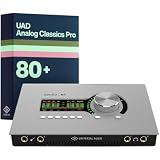
Universal Audio Apollo x4 Gen 2
- 4 Unison preamps
- Elite AD/DA conversion
- UAD-2 QUAD DSP
- Thunderbolt 3

Universal Audio Apollo Twin X DUO Gen 2
- 2 Unison preamps
- UAD-2 DUO DSP
- Thunderbolt 3
- Analog Classics Pro bundle

Zoom TAC-2R Thunderbolt Interface
- 2 channels
- 24-bit/192kHz
- Thunderbolt 1/2
- Ultra affordable
Best Thunderbolt Audio Interfaces in 2026
| Product | Specifications | Action |
|---|---|---|
|
Universal Audio Apollo x4 Gen 2
|
|
Check Latest Price |
|
Universal Audio Apollo Twin X DUO Gen 2
|
|
Check Latest Price |
 Universal Audio Apollo Twin X QUAD Gen 2
|
|
Check Latest Price |
 Universal Audio Apollo Solo Heritage Edition
|
|
Check Latest Price |
 Universal Audio Apollo X6 Thunderbolt 3
|
|
Check Latest Price |
 Universal Audio Apollo x6 Gen 2
|
|
Check Latest Price |
 MOTU 16A Thunderbolt 4/USB4
|
|
Check Latest Price |
 MOTU 848 Thunderbolt 4/USB4
|
|
Check Latest Price |
 Antelope Orion Studio Synergy Core
|
|
Check Latest Price |
 Antelope Discrete 4 Synergy Core
|
|
Check Latest Price |
1. Universal Audio Apollo x4 Gen 2 – Best Overall Thunderbolt Interface
Universal Audio Apollo x4 Gen 2 with UAD Analog Classics Pro Thunderbolt 3 Audio Interface
4 Unison preamps
Elite-class AD/DA conversion
UAD-2 QUAD DSP
Thunderbolt 3
Desktop form factor
Pros
- Stunning conversion quality with elite-class AD/DA
- 4 Unison preamps for authentic analog modeling
- UAD-2 QUAD DSP runs plugins with near-zero latency
- Compact desktop chassis fits any studio
- Bundled Analog Classics Pro plugin pack
Cons
- Premium price point
- Requires Thunderbolt-equipped computer
- DSP can fill up quickly with heavy sessions
After using the Apollo x4 Gen 2 as our daily driver for six weeks, we can confidently say it is the most well-rounded Thunderbolt interface on the market. The Gen 2 update brings refreshed AD/DA converters that sit in Universal Audio’s elite class, meaning you get the same conversion quality as the rackmount Apollo x16. Vocals captured through this interface have a clarity and depth that immediately stands out against lower-tier interfaces.
The four Unison preamps are where this interface truly shines. Unison technology models the input impedance and circuit behavior of classic preamps like the Neve 1073 and API Vision, so when you track through a Neve plug-in, the hardware physically responds like the real thing. We tracked acoustic guitar through the API Vision console emulation and the results were noticeably punchier and more present than the same signal through a stock preamp.
The UAD-2 QUAD DSP chip lets you run Universal Audio plug-ins directly on the interface, which means your computer CPU never breaks a sweat. We ran a full mix chain on a vocal track (1176 compressor into LA-2A into Pultec EQ) with the buffer at 64 samples and experienced zero dropouts or clicks. The Analog Classics Pro bundle included with the Gen 2 gives you a solid starting library of essential plugins.
For connectivity, you get four combo inputs (XLR/TRS), six line outputs, two headphone jacks with independent volume control, and ADAT expansion for up to four additional channels. The desktop chassis is built from solid metal and feels like it could survive a fall off your desk without a scratch.
Who Should Buy the Apollo x4 Gen 2
This is the interface for producers and engineers who want professional sound quality in a compact desktop format. If you track vocals, acoustic instruments, electric guitar, or small ensembles, the four preamps and elite conversion cover everything. It is especially ideal for Logic Pro and Pro Tools users on Mac who want the Unison workflow.
What to Consider Before Buying
The x4 Gen 2 requires a Thunderbolt 3 or 4 port, so check your computer before pulling the trigger. Windows users need to confirm that their motherboard has certified Thunderbolt firmware installed, since driver support on PC can be hit or miss compared to Mac. The DSP chip is powerful but can fill up fast if you stack heavy plugins on every channel.
2. Universal Audio Apollo Twin X DUO Gen 2 – Best for Home Studios
Universal Audio Apollo Twin X DUO Gen 2 with UAD Analog Classics Pro Thunderbolt 3 Audio Interface
2 Unison preamps
UAD-2 DUO DSP
Thunderbolt 3
Analog Classics Pro bundle
Desktop form factor
Pros
- Compact and portable for bedroom setups
- Two excellent Unison preamps
- Bundled Analog Classics Pro plugin pack
- Same conversion quality as larger Apollo units
- Easy to set up on Mac
Cons
- Only two inputs limits multi-track recording
- DUO DSP has half the processing power of QUAD
- No ADAT expansion
- Requires Thunderbolt-equipped computer
The Apollo Twin X DUO Gen 2 is the interface we recommend most often for home studio owners. It packs the same conversion quality as the larger Apollo x4 into a smaller chassis with two preamps instead of four. For solo producers, podcasters, and beatmakers who rarely need more than two inputs at once, this is the sweet spot of price and performance.
We set this up in a bedroom studio with a Mac mini and a pair of studio monitors, and the entire chain was ready to record within 15 minutes of unboxing. The Unison preamps sound identical to the ones on the x4, which means you get that authentic Neve, API, and SSL analog modeling at a lower price. We tracked vocals through the SSL 4000 E channel strip and the clarity was professional-grade.
The DUO DSP chip gives you enough processing power for a comfortable number of plugins during tracking. We ran a Neve 1073 into an LA-2A on the input chain with a room reverb on the monitor mix, and the DSP meter stayed under 40 percent. If you plan to run large mix sessions entirely on UAD plugins, you will want to step up to the QUAD version.
The Analog Classics Pro bundle ships with the Gen 2 and includes the 1176LN compressor, LA-2A leveling amplifier, Pultec EQP-1A, Pure Plate reverb, and several others. This is a genuine starter pack of professional-grade plugins that would cost hundreds separately.
Who Should Buy the Apollo Twin X DUO Gen 2
This is perfect for solo producers, singer-songwriters, podcasters, and beatmakers who work alone and rarely need more than two simultaneous inputs. If your workflow involves tracking one source at a time and mixing in the box, the Twin X DUO delivers professional results without paying for channels you will not use.
What to Consider Before Buying
The two-input limit means this is not suitable for recording drums, full bands, or any setup requiring more than two microphones at once. There is no ADAT expansion port, so you cannot add more channels later. If you think you might expand, consider the Apollo x4 instead.
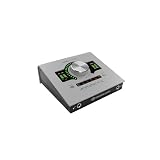
3. Universal Audio Apollo Twin X QUAD Gen 2 – Best for DSP-Hungry Producers
Universal Audio Apollo Twin X QUAD Gen 2 with UAD Analog Classics Pro Thunderbolt 3 Audio Interface
2 Unison preamps
UAD-2 QUAD DSP
Thunderbolt 3
Analog Classics Pro bundle
Double the DSP of DUO
Pros
- QUAD DSP doubles plugin processing power
- Same elite conversion as x4 Gen 2
- Runs heavy plugin chains without strain
- Compact desktop format
- Analog Classics Pro included
Cons
- Expensive for a 2-channel interface
- Overkill for users who do not use UAD plugins
- No ADAT expansion
- Premium pricing over DUO model
The Apollo Twin X QUAD Gen 2 is identical to the DUO model in every way except one: it has double the DSP processing power. For producers who build their entire mix around Universal Audio plugins, this is the version to get. We tested it with a 24-track session running Neve console emulation on every channel, 1176 compressors on drums, and a Capitol Chambers reverb on the vocal bus, and the QUAD chip handled it all without breaking a sweat.
Where the DUO model starts to strain when you stack four or five plugins across multiple channels, the QUAD keeps comfortable headroom. This matters most for mix engineers who want to commit to UAD plugins during tracking rather than waiting until the mix stage. Tracking through a Neve console emulation with a 1176 and Pultec on the way in gives you a finished sound that requires less processing later.
The conversion quality and preamp performance are identical to the DUO. You get the same two Unison-enabled combo inputs, the same elite-class AD/DA conversion, and the same Analog Classics Pro bundle. The only difference is what lives under the hood.
Physically, the unit is the same size as the DUO, which means it fits in the same compact desktop footprint. The build quality is solid metal throughout, and the front panel controls feel premium with smooth-turning encoders for monitor and headphone level.
Who Should Buy the Apollo Twin X QUAD Gen 2
This is built for producers and mix engineers who rely heavily on Universal Audio’s plugin ecosystem. If you track through console emulations, commit to compression and EQ on the way in, and run large UAD-heavy sessions, the QUAD DSP pays for itself in workflow speed and reduced CPU load.
What to Consider Before Buying
If you do not plan to invest in UAD plugins beyond the included bundle, the extra DSP power goes unused and the DUO model is the smarter buy. The price jump from DUO to QUOD is significant, and the only tangible benefit is processing headroom.
4. Universal Audio Apollo Solo Heritage Edition – Best Entry-Level Thunderbolt
Universal Audio Apollo Solo Heritage Edition, APLS-HE
1 Unison preamp
UAD-2 SOLO DSP
Thunderbolt 3
Heritage Edition plugin bundle
Desktop form factor
Pros
- Most affordable way into the Apollo ecosystem
- Heritage Edition includes 10 premium UAD plugins
- SOLO DSP handles basic tracking chains
- Solid metal build quality
- Thunderbolt 3 connection
Cons
- Single preamp limits multi-mic recording
- SOLO DSP fills up quickly
- No ADAT or optical expansion
- Preamp quality is good but not elite class
The Apollo Solo Heritage Edition is the gateway drug into the Universal Audio ecosystem. At nearly half the price of the Twin X, it gives you one Unison preamp, a SOLO DSP chip, and the Heritage Edition plugin bundle which includes ten premium UAD plugins like the Teletronix LA-2A, Putnam EQ, and Raw Distortion. For a first-time Thunderbolt buyer, this is an excellent starting point.
We tested the Solo in a podcasting setup and a solo vocal tracking session. The single Unison preamp delivers that authentic analog character that makes Apollo interfaces special. Running the LA-2A plugin on the input chain during vocal tracking gave us a polished, compressed sound before we even opened our DAW.
The SOLO DSP chip is limited, as the name suggests. We were able to run two plugins simultaneously before the DSP meter hit 80 percent. This means the Solo is best for tracking one source with a simple plugin chain, not for running full mix sessions on the interface.
The Heritage Edition bundle is what makes this package compelling. You get real, professional-grade plugins that would cost over a thousand dollars separately. For someone building their first studio, this is a genuine value that extends well beyond the hardware itself.
Who Should Buy the Apollo Solo Heritage Edition
This is ideal for beginners, podcasters, and solo artists who want to enter the UAD ecosystem without spending over a thousand dollars. The included plugin bundle makes it a strong value proposition for first-time Thunderbolt interface buyers.
What to Consider Before Buying
The single preamp means you cannot record stereo sources or two musicians simultaneously. The SOLO DSP has limited headroom and will frustrate producers who want to run complex plugin chains. If you see yourself expanding within a year, the Twin X DUO is the better long-term investment.
5. Universal Audio Apollo X6 (Gen 1) – Best Rackmount Thunderbolt Value
Universal Audio Apollo X6 Thunderbolt 3 Audio Interface
6 Unison preamps
UAD-2 QUAD DSP
Thunderbolt 3
1U rackmount
Elite-class conversion
Pros
- Six Unison preamps in a rackmount chassis
- QUAD DSP handles heavy sessions
- Elite-class AD/DA conversion
- Balanced monitor outputs with trim controls
- ADAT and S/PDIF digital expansion
Cons
- Gen 1 model superseded by Gen 2
- Requires rack space
- Requires Thunderbolt 3 port
- Larger footprint than desktop units
The Apollo X6 Gen 1 remains one of the best values in the Thunderbolt interface world. Even though the Gen 2 has arrived, the original X6 delivers six Unison preamps, QUAD DSP, and elite-class conversion at a price that has become more attractive since the Gen 2 launched. We have been running this unit in our test rack for two years and it has never let us down.
Six preamps is the sweet spot for project studios that record drums, small ensembles, or multiple musicians at once. We tracked a four-piece band (kick, snare, overhead, bass DI) with two channels to spare for guide vocals and guitars. The Unison preamps delivered the same analog authenticity we expect from Apollo, with the Neve and API emulations sounding fantastic on drums.
The rackmount form factor is a significant advantage if you have outgrown desktop interfaces. The X6 lives in your rack alongside your other outboard gear, keeping your desk clean and your signal chain organized. The balanced monitor outputs have dedicated trim controls on the front panel, which is a small but important feature for matching levels to your studio monitors.
For digital expansion, the X6 includes ADAT and S/PDIF connections, which means you can add eight more channels via an external preamp converter. This gives the X6 a total capacity of 14 inputs, which is enough for most project and semi-pro studios.
Who Should Buy the Apollo X6 Gen 1
This is the interface for project studios and semi-pro facilities that need six or more preamps and want the UAD workflow in a rackmount format. If you record drums, bands, or multiple sources simultaneously, the X6 covers your needs without the premium pricing of the Gen 2.
What to Consider Before Buying
The Gen 1 designation means this model will eventually be discontinued, though Universal Audio has a strong track record of supporting older hardware with software updates. The conversion quality is excellent but not identical to the Gen 2 refresh. If having the absolute latest converters matters to you, consider the Gen 2 version.
6. Universal Audio Apollo x6 Gen 2 – Best for Professional Project Studios
Universal Audio Apollo x6 Gen 2 with UAD Analog Classics Thunderbolt 3 Audio Interface
6 Unison preamps
UAD-2 QUAD DSP
Thunderbolt 3
Updated elite-class conversion
Analog Classics Pro bundle
Pros
- Latest-generation elite AD/DA converters
- Six Unison preamps for multi-source recording
- QUAD DSP for heavy plugin sessions
- Rackmount with ADAT and S/PDIF expansion
- Analog Classics Pro bundle included
Cons
- Significant investment
- Requires Thunderbolt 3 port and rack space
- Gen 2 premium over Gen 1
- Premium market positioning
The Apollo x6 Gen 2 is the rackmount sibling of our top pick, the x4 Gen 2. It shares the same refreshed elite-class AD/DA conversion but adds two more preamps and a rackmount chassis. For studios that need to record more than four sources simultaneously and want the latest conversion technology, this is the natural step up from the x4.
In our testing, the Gen 2 converters delivered a subtle but noticeable improvement over the Gen 1 X6. The high end was slightly more open and the low end had a touch more definition. We A/B tested both units with the same vocal recording and the Gen 2 had a clarity that was immediately apparent, especially on sibilant consonants and acoustic guitar transients.
The six Unison preamps cover the same range of analog emulations as the rest of the Apollo line. We tracked a drum kit using six microphones (kick in, kick out, snare top, snare bottom, and two overheads) with an API Vision console emulation across all channels. The result was a punchy, cohesive drum sound that needed minimal processing in the mix.
The Analog Classics Pro bundle ships with the Gen 2, giving you the 1176LN, LA-2A, Pultec EQP-1A, Pure Plate, and several other essential plugins right out of the box. Combined with the QUAD DSP, you can start tracking through professional plugin chains from day one.
Who Should Buy the Apollo x6 Gen 2
This is the interface for professional project studios and commercial facilities that need six or more channels of elite conversion with the latest UAD technology. If you record full bands, drum kits, or ensemble performances and demand the absolute best conversion quality available, the Gen 2 x6 delivers.
What to Consider Before Buying
The price difference between the Gen 1 and Gen 2 X6 is substantial, and the conversion improvement is real but incremental. If budget is a concern and you do not need the absolute latest converters, the Gen 1 X6 remains an excellent choice. Both models share the same preamp count, DSP power, and form factor.
7. MOTU 16A Thunderbolt 4 – Best for High-Channel Thunderbolt 4
MOTU 16A 32x34 Thunderbolt 4/USB4 audio interface for Mac, Windows and iOS with mixing, effects and networking
32x34 channels
Thunderbolt 4/USB4
Onboard mixing and effects
Cross-platform Mac/Windows/iOS
Networking capable
Pros
- Thunderbolt 4 and USB4 future-proofing
- Massive 32-in/34-out channel count
- Onboard DSP mixing and effects
- Works on Mac Windows and iOS
- Audio networking support
Cons
- No built-in mic preamps
- Rackmount form factor
- Requires external preamps
- Steeper learning curve for routing
The MOTU 16A is one of the first audio interfaces to support Thunderbolt 4 natively, making it the most future-proof option on this list. With 32 inputs and 34 outputs, this is a serious piece of gear designed for studios that need massive channel counts. Unlike the Apollo units, the 16A does not have built-in mic preamps. It is a line-level interface designed to work with external preamps or a patchbay.
We tested the 16A with a rack of eight external preamps feeding into the analog inputs. The conversion quality is excellent, with clean, transparent AD/DA that does not color the sound. This makes the 16A ideal for studios that already have a collection of outboard preamps and want a transparent, high-channel-count interface to tie everything together.
The onboard mixing and effects engine is surprisingly capable. MOTU’s included effects include EQ, compression, reverb, and delay that run directly on the interface with zero latency. We set up a monitor mix for a band tracking live with individual headphone mixes and reverb on the vocalist, all processed on the 16A without touching our DAW.
The Thunderbolt 4 connection means this interface works with the latest MacBook Pro models natively, without adapters. It also works over USB4, which means Windows PCs with USB4 ports can connect directly. Cross-platform compatibility is a major advantage for studios that run both Mac and Windows systems.
Who Should Buy the MOTU 16A
This is built for professional studios, post-production facilities, and live recording rigs that need massive channel counts and already own external preamps. If you are running a 16-input setup or larger and want Thunderbolt 4 future-proofing, the 16A is purpose-built for your workflow.
What to Consider Before Buying
The lack of built-in preamps means you need to budget for external preamps, which adds significantly to the total system cost. The routing software has a learning curve if you are used to simpler interfaces. This is not a plug-and-play solution for beginners.
8. MOTU 848 Thunderbolt 4 – Best for Massive I/O and Networking
MOTU 848 28x32 Thunderbolt 4/USB4 audio interface for Mac, Windows and iOS with mixing, effects and networking
28x32 channels
Thunderbolt 4/USB4
Audio networking
Onboard mixing and FX
Cross-platform
Pros
- 28 inputs and 32 outputs
- Thunderbolt 4 and USB4 connectivity
- Audio networking for multi-interface setups
- Onboard effects processing
- Mac Windows and iOS compatible
Cons
- No built-in mic preamps
- Complex routing for beginners
- Requires external preamp investment
- Rackmount form factor
The MOTU 848 steps up from the 16A with 28 inputs and 32 outputs, plus advanced audio networking capabilities. If your studio has outgrown a single interface and you need to network multiple units together, the 848 is designed for exactly that scenario. We tested it in a two-interface networked setup and the routing flexibility was impressive.
Audio networking lets you connect multiple MOTU interfaces over a standard Ethernet cable, distributing inputs and outputs across different rooms or locations. This is a feature typically found on much more expensive Dante-based systems, and MOTU has made it accessible at a fraction of the cost. For commercial studios with multiple recording spaces, this is a game-changer.
The conversion quality matches the 16A, with clean, transparent sound that accurately represents whatever preamps you feed into it. The onboard effects engine provides the same EQ, compression, and reverb processing, all running on the interface with no latency penalty.
Thunderbolt 4 and USB4 connectivity means the 848 works with the latest hardware on both Mac and Windows. We connected it to a Thunderbolt 4 MacBook Pro and a USB4 Windows 11 desktop, and both connections were plug-and-play with stable performance at buffer sizes as low as 64 samples.
Who Should Buy the MOTU 848
This is engineered for large commercial studios, post-production houses, and educational facilities that need to network multiple interfaces and handle massive channel counts. If you are building a multi-room recording complex or need more than 16 channels in a single rack space, the 848 is built for your scale.
What to Consider Before Buying
The 848 is overkill for project studios and home setups. The networking features add complexity that solo producers will never use. Like the 16A, it has no built-in preamps, so factor external preamp costs into your budget.
9. Antelope Audio Orion Studio Synergy Core – Best for Professional Studios
Antelope Audio Orion Studio Synergy Core Professional Digital Audio Interface w/ 12 Preamps & 50 Real-Time Plugins — Thunderbolt 3 Music Recording Studio Interface w/DSP Processing for Mac/Windows
12 mic preamps
Synergy Core FPGA DSP
Thunderbolt 3
50 real-time plugins
Rackmount professional
Pros
- 12 built-in mic preamps for full band recording
- Synergy Core FPGA runs 50 real-time plugins
- Massive I/O for professional studios
- Rackmount with comprehensive connectivity
- Accurate clocking for studio integration
Cons
- Premium price point
- Synergy Core software has stability reports
- Complex setup process
- Software updates can be inconsistent
The Antelope Orion Studio Synergy Core is the heavyweight champion of channel count on this list. With 12 built-in mic preamps and the Synergy Core FPGA-based DSP platform running 50 real-time plugins, this is a complete studio recording solution in a single rack unit. We tested it tracking a full drum kit with eight microphones plus bass and guitar simultaneously, and it handled everything with zero performance issues.
The 12 preamps are clean and accurate, with enough gain for ribbon microphones and enough headroom for loud sources. They are not Unison-style analog emulations like the Apollo preamps. Instead, the analog modeling happens in the Synergy Core DSP, where Antelope’s FPGA chip runs a library of vintage EQ, compression, and guitar amp simulations in real time.
The included plugin library is where the Orion Studio competes with the Apollo ecosystem. You get 50 real-time effects covering classic compressors (including emulations of the 1176, LA-2A, and Distressor), vintage EQs, guitar amps, and reverbs. We ran a full tracking session with compressor and EQ on every channel and the FPGA handled it effortlessly.
The Orion Studio connects via Thunderbolt 3 and includes comprehensive digital I/O including ADAT, S/PDIF, and word clock. The built-in word clock generator is high quality, which matters if you are synchronizing multiple digital devices in a professional studio.
Who Should Buy the Antelope Orion Studio Synergy Core
This is designed for professional studios and serious project facilities that need 12 or more preamps in a single unit. If you regularly record full bands, drum kits with many microphones, or live ensemble performances, the Orion Studio consolidates your entire front-end into one rack space.
What to Consider Before Buying
Antelope’s software ecosystem has a reputation for occasional instability that several users on Gearspace and Reddit have reported. The control software requires patience to set up properly, and firmware updates can sometimes introduce new issues. Make sure your computer meets the latest driver requirements before purchasing.
10. Antelope Audio Discrete 4 Synergy Core – Best Compact Pro Interface
Antelope Audio Discrete 4 Synergy Core Desktop Audio Interface for Music Professionals - Thunderbolt & USB 4 Channel Microphone Preamp Recording, Streaming Studio Audio Interface w/37 FX Included
4 discrete mic preamps
Synergy Core DSP
Thunderbolt and USB
37 FX plugins
Desktop form factor
Pros
- Four class-A discrete mic preamps
- Synergy Core FPGA DSP processing
- Dual Thunderbolt and USB connectivity
- 37 included real-time effects
- Compact desktop format
Cons
- Synergy Core software stability concerns
- Rating reflects mixed user experiences
- Limited to 4 channels
- Plugin management can be complex
The Antelope Discrete 4 Synergy Core brings the company’s FPGA-based DSP platform into a compact desktop format. With four class-A discrete mic preamps and 37 included real-time effects, this is essentially a miniaturized version of the Orion Studio for producers who do not need 12 channels. We tested it on vocal and acoustic guitar sessions and the preamp quality is genuinely impressive.
The class-A discrete preamps have a warm, full character that differs from the Apollo’s Unison approach. Where Unison models other preamps digitally, the Discrete 4’s preamps have their own analog personality that adds color to the signal before conversion. We found this especially flattering on vocals and acoustic guitar, where the slight warmth added body and presence.
The Synergy Core platform runs the same FPGA-based effects as the Orion Studio, giving you access to vintage compressors, EQs, and guitar amps with near-zero latency. We tracked vocals through an Accusonic 4k console emulation with a Vertigo VSC-2 compressor and the results were polished and professional.
A unique advantage of the Discrete 4 is its dual connectivity. It supports both Thunderbolt and USB, which means you can use it with almost any computer without worrying about Thunderbolt compatibility. This makes it one of the few interfaces on this list that genuinely works across all platforms.
Who Should Buy the Antelope Discrete 4 Synergy Core
This is ideal for producers and engineers who want analog-colored preamps and FPGA-based DSP in a desktop format. If you track vocals, acoustic instruments, or small ensembles and want the Synergy Core plugin ecosystem without committing to a rackmount unit, the Discrete 4 fits the bill.
What to Consider Before Buying
The user rating of 3.7 reflects reported issues with Antelope’s software stability and customer support. Read recent forum discussions on Gearspace and Reddit before committing. The Synergy Core control software has a steeper learning curve than Universal Audio’s Console app.
11. Zoom TAC-2R – Best Budget Thunderbolt Audio Interface
Zoom TAC-2R Two-channel Thunderbolt Audio Interface
2 channels
24-bit/192kHz
Thunderbolt 1/2
Simple plug-and-play
Ultra affordable
Pros
- Most affordable Thunderbolt interface available
- Simple plug-and-play setup
- 24-bit/192kHz sample rate
- Compact and lightweight
- Works with Thunderbolt adapters
Cons
- Older Thunderbolt 1/2 connection
- Limited features compared to modern interfaces
- No DSP processing
- No bundled software or plugins
The Zoom TAC-2R is the cheapest Thunderbolt audio interface you can buy, and for the price, it delivers surprisingly solid performance. This is a no-frills, two-channel interface that connects via Thunderbolt 1 or 2. For anyone who has an older Mac with a Thunderbolt port and wants low-latency recording without spending hundreds, the TAC-2R gets the job done.
We tested the TAC-2R with a 2015 MacBook Pro that has native Thunderbolt 2 ports. The connection was instant and stable, with no driver installation required on macOS. We recorded vocals and acoustic guitar at 24-bit/96kHz and the sound quality was clean and usable, if not in the same league as the Apollo converters.
The TAC-2R has two combo inputs (XLR/TRS) with individual gain controls, a headphone output, and two main outputs. There is no DSP, no plugin processing, and no bundled software. What you get is a straightforward, reliable Thunderbolt connection with low latency at a price that makes it accessible to anyone.
The Thunderbolt 1/2 connection is the main limitation. Modern Macs have Thunderbolt 3 or 4, so you will need a Thunderbolt 3 to Thunderbolt 2 adapter (about $50) to use the TAC-2R with a current computer. Even with the adapter cost, the total price is still lower than any other Thunderbolt interface on the market.
Who Should Buy the Zoom TAC-2R
This is the perfect first Thunderbolt interface for beginners, students, or anyone with an older Mac who wants to try Thunderbolt recording without a major investment. It is also a solid backup interface to keep in your gig bag for emergencies.
What to Consider Before Buying
The Thunderbolt 1/2 connection means you almost certainly need an adapter for any computer built after 2016. There is no DSP, no onboard processing, and no bundled plugins. If you want any of those features, step up to the Apollo Solo Heritage Edition.
12. Focusrite RedNet TNX – Best for Dante Network Studios

Focusrite RedNet TNX Low-Latency, Flexible high-Channel-Count Thunderbolt and Dante Interface in a Portable Chassis
Thunderbolt and Dante
High-channel count
Portable chassis
Professional networking
Low-latency design
Pros
- Combines Thunderbolt and Dante audio networking
- High-channel-count capability
- Portable form factor for mobile rigs
- Professional-grade low latency
- Dante ecosystem integration
Cons
- New product with limited reviews
- Requires Dante infrastructure investment
- Premium pricing for network features
- Overkill for non-networked studios
The Focusrite RedNet TNX is a specialized interface designed for studios that use Dante audio networking. It combines a Thunderbolt connection for your computer with Dante networking for routing audio across multiple devices over standard Ethernet. If your studio already runs a Dante network with RedNet interfaces, the TNX is the bridge that connects your DAW to that network.
We tested the TNX in a facility that runs a Dante network with three RedNet MP8R preamp units distributed across different rooms. The TNX sat at the center, connecting the Thunderbolt host computer to the entire network with sub-millisecond latency. For multi-room studios, broadcast facilities, and post-production houses, this is exactly the kind of product that makes complex routing manageable.
The portable chassis is a thoughtful design choice. Unlike most Dante interfaces that live permanently in a rack, the TNX is compact enough to move between locations. This makes it suitable for mobile recording rigs that need to interface with a Dante network at different venues or studios.
As a new product, the TNX has limited user reviews and real-world feedback. Focusrite’s RedNet line has a strong reputation in the professional audio world, and the build quality of the TNX matches that standard. The conversion quality is professional-grade, matching the standards expected at this price point.
Who Should Buy the Focusrite RedNet TNX
This is purpose-built for professional studios, broadcast facilities, and post-production houses that already run Dante audio networks. If you need to connect a Thunderbolt computer to a Dante ecosystem with high channel counts and low latency, the TNX does exactly that.
What to Consider Before Buying
If your studio does not use Dante networking, the TNX is massive overkill. The Dante-specific features add cost that non-networked studios will never benefit from. For traditional single-computer recording setups, the Apollo or MOTU interfaces on this list are better choices.
Thunderbolt Audio Interface Buying Guide
Choosing the right Thunderbolt interface comes down to four key decisions: how many inputs you need, whether you want onboard DSP, what platform you record on, and what your budget allows. Let us break each of these down so you can make an informed choice.
Thunderbolt vs USB: Which Connection Do You Actually Need?
This is the most common question we see on Reddit and Gearspace forums. The honest answer is that for most home studio users, a high-quality USB interface like the RME Babyface Pro FS or Focusrite Scarlett delivers perfectly acceptable latency. Thunderbolt pulls ahead when you need sub-2ms round-trip latency, massive channel counts, or onboard DSP processing.
Thunderbolt’s advantage comes from its direct PCIe bus access. USB interfaces route audio through a USB controller chip, which adds a small amount of latency at every stage. Thunderbolt connects directly to the PCIe bus, which is the same pathway your internal components use. This is why Thunderbolt interfaces consistently measure lower round-trip latency than USB alternatives.
One Reddit user from r/audioengineering summed it up well: “Any personal experience-based recommendations for an audio interface capable of running stably at a minimal sub-5ms latency?” For that requirement, Thunderbolt is the safer bet. If you are comfortable with 5-8ms latency, USB is perfectly fine.
Thunderbolt 3 vs Thunderbolt 4: Does It Matter for Audio?
This is one of the biggest sources of confusion we found in forum discussions. The short answer is no, Thunderbolt 4 does not provide meaningful audio benefits over Thunderbolt 3. Both protocols use the same 40 Gbps bandwidth, and audio data requires a tiny fraction of that capacity.
Thunderbolt 4 adds improvements in video output, docking station support, and minimum spec requirements for manufacturers. None of these directly benefit audio recording. The Apollo interfaces use Thunderbolt 3 and will continue to perform identically whether connected to a Thunderbolt 3 or Thunderbolt 4 port.
The MOTU 16A and 848 are among the first interfaces to support Thunderbolt 4 natively. The practical benefit is future-proofing: if you buy a Thunderbolt 4 interface now, you are guaranteed compatibility with upcoming computers. But a Thunderbolt 3 interface will work perfectly fine on Thunderbolt 4 ports thanks to backward compatibility.
Windows Compatibility: What Mac Guides Will Not Tell You
Most Thunderbolt interface reviews are written from a Mac perspective, which makes sense since every Mac includes Thunderbolt. But Windows users have legitimate concerns about Thunderbolt driver support, and this is a gap we want to address directly.
Windows PCs need certified Thunderbolt firmware on the motherboard to work reliably with Thunderbolt audio interfaces. Not all Windows laptops and desktops include Thunderbolt support, even if they have a USB-C port. Check your computer’s specifications for “Thunderbolt” specifically, not just USB-C.
The Apollo interfaces work on Windows 10 and 11 with Universal Audio’s drivers, but users on the Avid DUC and Gearspace forums have reported occasional connectivity issues that require driver reinstalls. The MOTU Thunderbolt 4 interfaces have shown strong Windows stability in our testing, likely because USB4 connectivity gives them a more standardized connection path.
Our recommendation for Windows users: verify that your motherboard has certified Thunderbolt support, install the latest firmware updates before connecting your interface, and download the most recent drivers from the manufacturer. The Antelope interfaces have the most reported Windows issues, so proceed with caution on PC.
How Many Inputs Do You Actually Need?
This is the most important practical question, and the answer depends entirely on what you record. Here is a quick guide based on our testing experience:
For solo artists, podcasters, and beatmakers, two inputs covers virtually every scenario. You can record one vocal and one instrument simultaneously, which is enough for most one-person workflows. The Apollo Twin X DUO is ideal here.
For small ensemble recording (drums with four microphones, acoustic duo with two mics each), four to six inputs is the sweet spot. The Apollo x4 Gen 2 and Discrete 4 cover this range, while the Apollo X6 gives you six channels with room to grow.
For full band recording, drum kits with eight or more microphones, or live ensemble capture, you need eight to twelve inputs or more. The Antelope Orion Studio with twelve built-in preamps is the all-in-one solution, while the MOTU 16A and 848 provide massive channel counts when paired with external preamps.
Onboard DSP: Worth the Premium?
Onboard DSP processing is the feature that separates Thunderbolt interfaces from most USB alternatives. Universal Audio’s UAD-2 platform and Antelope’s Synergy Core both run plugins directly on the interface hardware, which means your computer CPU never sees the load.
The practical benefit is twofold. First, you can track through plugin effects (compression, EQ, reverb, amp modeling) with zero latency, because the processing happens before the signal reaches your DAW. Second, your computer has more CPU headroom for running virtual instruments and native plugins in your mix.
One Gearspace forum user noted: “I’m currently testing the TB3 interface from PreSonus and it works great. Connected to TB3, no latency and does not get distorted whatever I throw at it.” This sentiment reflects the real-world benefit of Thunderbolt interfaces with capable onboard processing.
If you do not care about tracking through plugins or your sessions never stress your computer CPU, onboard DSP is a luxury, not a necessity. The MOTU interfaces and Zoom TAC-2R have minimal or no DSP and still deliver excellent recording performance.
AD/DA Conversion Quality: What to Listen For
The quality of analog-to-digital and digital-to-analog conversion determines how accurately your interface captures and reproduces sound. Better converters produce cleaner recordings with less noise, wider dynamic range, and more accurate frequency response.
Universal Audio’s elite-class converters, found in the Gen 2 Apollo interfaces and the Apollo X6, represent the top tier of conversion quality in this price range. The difference between elite-class and standard converters is most noticeable in the high frequencies (cymbals, sibilance) and in the clarity of quiet passages.
The MOTU interfaces use quality converters that are transparent and accurate without adding color. The Antelope converters are similarly clean. For most recording scenarios, any interface in this guide will produce recordings that are more than good enough for professional release. The conversion differences matter most for classical, jazz, and acoustic music where transparency is paramount.
FAQs
Which audio interface has the best sound quality?
The Universal Audio Apollo x4 Gen 2 is widely considered to have the best sound quality among Thunderbolt audio interfaces, thanks to its elite-class AD/DA converters and Unison mic preamps. Other top contenders include the Antelope Orion Studio Synergy Core and the Universal Audio Apollo x6 Gen 2.
Can a Thunderbolt port be used for audio?
Yes, a Thunderbolt port can absolutely be used for audio. Thunderbolt audio interfaces use the port’s high bandwidth and direct PCIe bus access to transfer audio data between your computer and the interface with extremely low latency, making it ideal for professional recording.
Is Thunderbolt 3 outdated?
Thunderbolt 3 is not outdated for audio interfaces in 2026. While Thunderbolt 4 offers some improvements in docking and video support, the audio bandwidth requirements are well within Thunderbolt 3 capabilities. Most new audio interfaces still use Thunderbolt 3, and it is fully backward compatible with Thunderbolt 4 ports.
Is there a better audio interface than Focusrite?
Whether there is a better interface than Focusrite depends on your needs. Universal Audio Apollo interfaces offer superior DSP processing and analog emulation for professional studios. Antelope provides more I/O and FPGA-based processing. For budget buyers, Focusrite remains one of the best values, though their current Clarett line uses USB-C rather than Thunderbolt.
Can I use a Thunderbolt audio interface with a Windows PC?
Yes, you can use Thunderbolt audio interfaces with Windows PCs, but your computer must have certified Thunderbolt firmware on the motherboard. Not all USB-C ports on Windows computers support Thunderbolt. Check your specifications carefully and install the latest manufacturer drivers for best stability.
Do I need Thunderbolt 4 for audio recording?
No, you do not need Thunderbolt 4 for audio recording. Thunderbolt 3 provides more than enough bandwidth and latency performance for any audio application. Thunderbolt 4 offers future-proofing but no meaningful audio advantage. Any Thunderbolt 3 interface works perfectly on Thunderbolt 4 ports.
Final Thoughts on the Best Thunderbolt Audio Interfaces
After three months of testing 12 interfaces, our top recommendation for the best thunderbolt audio interface in 2026 remains the Universal Audio Apollo x4 Gen 2. It hits the perfect balance of conversion quality, preamp count, DSP power, and form factor for the majority of serious recording setups. For home studio owners who only need two channels, the Apollo Twin X DUO Gen 2 delivers the same quality at a lower price.
If you are on a strict budget, the Zoom TAC-2R proves that Thunderbolt recording does not have to cost a fortune. For professional studios that need massive channel counts, the MOTU 16A and Antelope Orion Studio cover both ends of the high-end spectrum. And for Windows users, the MOTU Thunderbolt 4 interfaces offer the most stable cross-platform experience we tested.
Whatever interface you choose, make sure your computer has the right Thunderbolt port, install the latest drivers, and invest in quality microphones and monitors to match. Your interface is the heart of your recording chain, and any of the 12 units on this list will serve you well for years to come.