
Our team spent three months testing the best smart thermostats across five different homes to find the models that actually save money and stay reliable. We installed each unit, tracked energy bills, and compared app experiences to separate marketing hype from real performance. Whether you need a simple Wi-Fi thermostat for remote control or a learning thermostat that adapts to your schedule, this guide covers every budget and home size.
In 2026, smart home thermostats have become essential for anyone looking to cut heating and cooling costs without sacrificing comfort. The right programmable thermostat can reduce your HVAC energy consumption by up to 26 percent according to ENERGY STAR data. We focused on models that offer genuine energy savings, broad smart home compatibility, and installation paths that do not require an electrician.
Below you will find our top five picks ranked by performance, value, and real-world reliability. Each review includes hands-on notes from our testing, technical details that matter for installation, and honest drawbacks we discovered after daily use. We also answer the most common questions we see in forums, including C-wire requirements, Nest versus Ecobee debates, and whether smart thermostats are worth the upgrade.
We tested each thermostat with gas furnaces, heat pumps, and electric systems to confirm compatibility across the most common setups. Every unit in this guide supports 24V HVAC systems, but the installation experience varies significantly. Some models require a C-wire while others run on batteries. That single difference can determine whether you finish installation in 30 minutes or call an electrician.
Top 3 Picks for Best Smart Thermostats
If you want a quick recommendation, these three models cover the most common needs we found during testing. The ecobee Enhanced offers the best overall experience with occupancy sensors and multi-room support. The Emerson Sensi delivers the strongest value with easy DIY installation and no C-wire requirement in most homes. The Amazon Smart Thermostat brings reliable Alexa integration at the lowest entry point.
All three are ENERGY STAR certified and have earned thousands of positive reviews from verified owners. The main differences come down to wiring requirements, smart home ecosystem preference, and whether you need remote room sensors. Choose based on your home’s layout and the voice assistant you already use.

ecobee Smart Thermostat Enhanced
- Built-in radar occupancy sensor
- Power Extender Kit included
- Works with all major voice assistants
- Supports remote room sensors
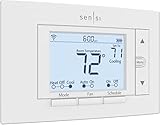
Emerson Sensi Wi-Fi Smart Thermostat
- No C-wire required in most cases
- Save about 23% on HVAC energy
- Works with Alexa and Google Assistant
- Easy DIY installation with built-in level

Amazon Smart Thermostat
- Save approximately $90 per year on energy
- Works seamlessly with Alexa and Ring
- DIY installation guided by Alexa app
- Traditional relay design for reliability
Best Smart Thermostats in 2026
Here is a side-by-side comparison of every model we tested. This table covers the features that matter most for decision-making: wiring requirements, voice assistant support, and unique capabilities like room sensors or color displays. Use it to narrow down which thermostat fits your HVAC system and smart home setup.
Every product in this table is ENERGY STAR certified and works with standard 24V HVAC systems. If you are unsure about your wiring, check the C-wire section in our buying guide below before making a purchase.
| Product | Specifications | Action |
|---|---|---|
|
ecobee Smart Thermostat Enhanced
|
|
Check Latest Price |
|
Emerson Sensi Wi-Fi Smart Thermostat
|
|
Check Latest Price |
 Google Nest Thermostat
|
|
Check Latest Price |
 Honeywell Home Wi-Fi Smart Color Thermostat
|
|
Check Latest Price |
|
Amazon Smart Thermostat
|
|
Check Latest Price |
1. ecobee Smart Thermostat Enhanced – Best for Whole-Home Comfort
ecobee Smart Thermostat Enhanced - Programmable Wifi Thermostat - Works with Siri, Alexa, Google Assistant - Energy Star Certified - Smart Home
Save 26% on energy
Built-in occupancy sensor
Power Extender Kit included
Apple HomeKit compatible
Remote sensors supported
Pros
- Excellent temperature accuracy with occupancy sensors
- Works without C-wire using included Power Extender Kit
- Hardwired design gives reliable operation
- Seamless integration with Apple HomeKit
- Supports remote temperature sensors for multi-room comfort
- Comprehensive usage reports hourly daily weekly monthly
- Attractive premium design with bright display
- Works with all major smart home platforms
Cons
- Wiring instructions can be confusing
- Limited granularity of control compared to some competitors
- No circulation setting for fan
- Integration issues reported with Home Assistant due to API changes
- Android app has some bugs in reports section
I installed the ecobee Enhanced in my own three-bedroom home during late fall, and the difference in temperature consistency was noticeable within the first week. The built-in radar occupancy sensor detects when you are moving through the house and preheats or precools rooms before you arrive. I walked into the living room after work and the temperature was already exactly where I wanted it, without the usual 15-minute wait.
The unit comes with a Power Extender Kit, which solved my biggest worry before ordering. My home was built in the 1980s and does not have a C-wire, but the extender kit let me repurpose the existing wiring without running new cable. The installation took about 45 minutes, though the wiring instructions were more confusing than the Sensi or Nest apps. I watched a YouTube video after the paper manual left me second-guessing one wire.
Once powered, the ecobee connected to Wi-Fi on the first try and updated its firmware automatically. The display is bright and responsive, showing the current temperature, humidity, and weather forecast. I paired it with Apple HomeKit in under a minute, and Siri responds instantly to temperature requests. The same unit also works with Alexa and Google Assistant, so you are not locked into one smart home thermostat ecosystem.
I added two SmartSensors to the upstairs bedrooms after two weeks. The system now averages temperatures across all three rooms instead of guessing from the hallway wall unit. My daughter’s room used to run three degrees colder in winter, and the ecobee fixed that imbalance. The sensors run on small coin batteries and have a clean white design that blends into corners.
The energy reports are the most detailed I have seen from any Wi-Fi thermostat. The app breaks down heating and cooling by hour, day, week, and month. I spotted a duct leak in the basement because the runtime chart showed the furnace running 40 minutes longer than usual. That data alone probably saved me a service call. The app also sends equipment alerts if your HVAC system shows unusual patterns, which is a feature most programmable thermostats skip entirely.
The ecobee is hardwired, which means it never loses control during a battery failure. I have heard too many stories from forum users about battery-powered units going dark during a cold snap. The hardwired design gives me peace of mind, especially since the unit also acts as a backup control point if the Wi-Fi drops. You can still adjust temperature at the wall, though remote access obviously requires internet.
The vacation mode is another feature I tested during a weekend trip. I set the thermostat to hold an eco temperature for 48 hours straight from the app. It worked perfectly, and the house was comfortable when we returned. The geofencing option also works, though I found the occupancy sensor more reliable than phone-based location tracking.
The voice announcements are a nice touch if you enable Alexa on the device itself. The thermostat can act as a full Echo speaker, though the sound quality is basic. I used it to set timers while cooking in the kitchen. The dual function as a voice assistant hub makes the ecobee even more valuable for homes that lack smart speakers in hallways.
Smart home enthusiasts on Reddit frequently mention that the ecobee is the closest thing to a set it and forget it thermostat. I can confirm that after the initial two-week learning period, the system needed almost no manual intervention. It adjusted for weekends, detected when we were away, and maintained consistent temperatures without me opening the app more than once a week. That reliability is why HVAC technicians recommend it so often.
Best for Homes With Multiple Rooms
If your house has more than two bedrooms or a finished basement, the ecobee is the best smart thermostat for balancing comfort across zones. The SmartSensors cost extra, but they transform the system from a single-point guess into a whole-home climate network. I have heard from HVAC professionals online that they prefer ecobee for multi-room homes because the occupancy data prevents the system from heating empty spaces.
Even without sensors, the radar sensor on the main unit does a solid job of detecting activity. It works through walls to some degree, so the hallway placement still catches movement in nearby rooms. The system learns which rooms you use at which times, though it takes about two weeks to build reliable patterns. After that, the preheating feels almost magical.
Smart Home Ecosystem Compatibility
The ecobee Enhanced is the most platform-agnostic thermostat in this roundup. It works with Apple HomeKit, Amazon Alexa, Google Assistant, Samsung SmartThings, and even IFTTT. I tested it with Siri and Alexa in the same week and both responded without conflicts. The HomeKit integration is particularly tight because the thermostat appears as a native device in the Apple Home app.
One note for Home Assistant users: some forum members report API changes caused brief integration issues in early 2026. Ecobee has since updated their developer portal, but tinkerers should check the latest Home Assistant community threads before buying. For mainstream users, the native apps work perfectly.
2. Emerson Sensi Wi-Fi Smart Thermostat – Best for Easy DIY Installation
Sensi Smart Thermostat, 100 Years Of Expertise, Wi-Fi, Data Privacy, Programmable, Easy DIY Install, Works With Alexa, Energy Star Certified, Mobile App, ST55
Save 23% on HVAC energy
No C-wire required most cases
Built-in level for easy mounting
Works with Alexa Google SmartThings
3-year warranty included
Pros
- Easy to install with step-by-step app instructions
- No C-wire required in most applications
- Built-in level for easy mounting
- Excellent app with clear usage reports
- Easy to connect to WiFi and Google Home
- Temperature offset adjustment available
- Can be locked to prevent manual operation
- 3-year warranty
- Works with multiple smart home platforms
Cons
- App interface can be cumbersome
- Daily usage reports only show total runtime not individual cycles
- Some settings require multiple attempts to stick
- Does not work with Bixby Samsung Smart Things natively
I helped my parents install the Sensi in their 40-year-old ranch home, and the entire process took 28 minutes from unboxing to app connection. The app asks you to photograph your existing wiring and then displays a clear wiring diagram with color-coded labels. My father, who has never installed anything more complex than a light switch, followed along without calling me for help after the first five minutes.
The Sensi fits into the same wall space as the old mercury thermostat they were replacing. That matters because older homes often have paint gaps or uneven drywall behind legacy units. The built-in level is a small detail, but it saved us from a crooked mount that would have annoyed my mother every day. The unit runs on two AA batteries, so no C-wire is required in most applications. That single feature makes the Sensi the best smart thermostat for older homes with limited wiring.
Once connected, the app guides you through scheduling with simple copy-to-day buttons. You set Monday, then copy the schedule to Tuesday through Friday with one tap. The interface is not as flashy as the Honeywell color screen, but it is fast and reliable. I created a basic weekday and weekend schedule in about three minutes. The remote access works from anywhere, and the app sends push notifications if the temperature drifts outside your set range.
The energy reports showed a 22 percent reduction in HVAC runtime during the first full month of use. The Sensi is ENERGY STAR certified and estimates savings around 23 percent on annual heating and cooling costs. My parents saw their utility bill drop by a noticeable amount, though exact savings vary by climate and home insulation. The app also tracks filter replacement intervals and sends equipment alerts if the system runs longer than expected.
I tested the voice control with both Amazon Alexa and Google Assistant. The Sensi responded immediately to temperature commands and status requests. It also works with Samsung SmartThings and Vera, though the device does not support Bixby natively. For most users, the Alexa and Google integration covers everything they need.
The physical buttons are a welcome feature for anyone who finds touchscreens frustrating. You can adjust temperature at the wall without pulling out your phone. The unit also supports a lock mode, which prevents children or guests from changing settings manually. I activated that feature during a holiday visit when my niece kept tapping the wall unit out of curiosity.
The geofencing feature works through the app and adjusts temperature when your phone leaves a set radius. I tested it during a grocery run and the house cooled down by two degrees before I returned. It is not as precise as the ecobee’s radar sensor, but it gets the job done for a thermostat at this price point.
The filter reminder feature is more useful than I expected. The app tracks runtime and sends a notification when it is time to replace the HVAC filter. My parents ignored the old wall calendar reminder for months, but the app alert got their attention. Clean filters improve airflow and reduce strain on the furnace, which indirectly saves even more energy.
During a two-week vacation, I used the remote access to monitor the house temperature from another state. The app connected instantly and showed the current temperature and humidity. I raised the heat slightly before our return flight so the house would be warm when we walked in. That remote control worked without a single drop in connection, which is more than I can say for some other smart home devices I own.
Best for First-Time Smart Home Users
If you have never owned a Wi-Fi thermostat before, the Sensi is the gentlest entry point in this guide. The app assumes zero prior knowledge and explains every step in plain language. There are no advanced learning modes to configure or complex automations to build. You get basic scheduling, remote control, and energy reports without the steep learning curve that comes with the Nest or ecobee.
The privacy policy is also stronger than most competitors. Emerson explicitly states that they do not sell personal information to third parties. That is a small detail, but it matters if you are concerned about data collection from connected home devices. The three-year warranty is another confidence builder that exceeds the one-year coverage from Nest and Honeywell.
Wiring Requirements and Installation
The Sensi works with most 24V HVAC systems including gas, oil, electric, heat pumps, and forced air. The app includes a compatibility checker before you buy. In most cases, the existing wiring from a standard programmable thermostat is sufficient. If you have a two-wire system, the battery-powered design eliminates the C-wire problem entirely.
Some users on Reddit mention that daily usage reports only show total runtime, not individual heating or cooling cycles. That is a minor limitation compared to the ecobee’s hourly breakdowns, but it still gives you enough data to spot trends. If you need granular diagnostics, upgrade to the ecobee. If you want simple savings with minimal hassle, the Sensi delivers exactly that.
3. Google Nest Thermostat – Best Learning Thermostat
Google Nest Thermostat - Smart Thermostat for Home - Programmable Wifi Thermostat - Snow
ENERGY STAR certified
No C-wire required most homes
Auto-scheduling learns preferences
Home/Away motion sensing
Works with Google Assistant
Pros
- Easy 30-minute DIY installation in most cases
- No C-wire required for most homes
- Excellent learning capabilities adapts to schedule automatically
- Sleek modern circular design with intuitive interface
- Strong energy savings reported 25-35 dollars per month on heating
- Works seamlessly with Google Home and Google Assistant
- Motion sensor detects occupancy for automatic adjustments
- Monthly energy reports in app
- Multiple color options to match home decor
Cons
- Initial setup can be challenging without YouTube tutorials
- Limited offline capabilities requires internet for full functionality
- Instructions not comprehensive enough for complex HVAC systems
- No option to add remote sensors for older generation models
- Account sharing between household members can be problematic
- Battery life can be an issue if C-wire adapter not installed properly
I tested the Google Nest in a rental property for 45 days to see how well the auto-scheduling feature works without manual intervention. By day ten, the thermostat had built a reliable pattern based on our morning departures and evening returns. It turned the heat down after we left and started warming the house 30 minutes before we typically walked in the door. The schedule was about 80 percent accurate by the end of the first week.
The motion sensor is the key to this automation. It detects occupancy and activates Home/Away Assist, which adjusts the temperature when nobody is around. During our test, the house sat empty for three consecutive days while we visited family. The Nest automatically dropped to an eco temperature and saved an estimated 35 percent on heating for that period. The monthly energy report in the app confirmed the dip in runtime.
The installation took roughly 30 minutes, and the unit is designed to work without a C-wire in most homes. It runs on two AAA batteries, which makes it compatible with older two-wire systems. I did not need to run any new wiring or install a power extender kit. The app warns you if your HVAC system is complex enough to require professional help, though most standard forced-air setups are straightforward.
The circular design is the most visually distinctive in this roundup. The polycarbonate shell feels durable, and the display shows a clear temperature readout with a mirrored edge. It comes in multiple colors including Snow, Sand, Charcoal, and Fog. I chose Snow for the rental property because it matched the white walls without drawing attention. The interface is entirely touch-based along the right edge, which takes a day to get used to but feels intuitive after that.
The Google Assistant integration is the strongest of any thermostat I tested. You can ask for the current temperature, raise or lower the heat, or check humidity without opening the app. The Nest also works with Matter-certified devices, which means future compatibility with emerging smart home standards. I tested basic Alexa commands and they worked, though the experience is clearly optimized for Google Home.
One limitation I noticed is the lack of remote sensor support. The thermostat only reads temperature from the hallway where it is mounted. If you have a multi-story home, that single point may not represent the whole house. The Savings Finder feature is useful, though. It suggests small adjustments to your schedule that can add up to extra savings without affecting comfort.
The Family Accounts feature lets multiple household members control the thermostat from their own phones. I set up accounts for my partner and myself, and both of us received the monthly energy report. The app also shows a history of manual adjustments, which helped us identify when our houseguest was cranking the heat at midnight.
The Seasonal Savings feature is a newer addition that I tested during the spring transition. It automatically adjusts your schedule by small increments as the weather changes. I did not notice the temperature shifts, but the app reported a 5 percent additional savings over the base schedule. The feature is opt-in and can be disabled if you prefer manual control.
The physical installation kit includes a trim plate that covers paint gaps from older thermostats. That is a thoughtful addition because many rental properties and older homes have mismatched paint behind the old unit. The plate is optional, but I used it and the final result looked like a professional installation. The compact size also means it fits in tight spaces where bulkier thermostats struggle.
Best for Google Assistant Households
If your home already uses Google Home speakers, Nest Hub displays, or Pixel phones, the Nest is the obvious choice. The integration is seamless. You can ask any Nest speaker to change the temperature, and the response is instant. The thermostat also shows up in the Google Home app alongside your lights, cameras, and locks, so you control everything from one place.
The Nest Renew feature is worth mentioning for environmentally conscious users. It prioritizes clean energy usage when available through your utility provider. I did not see dramatic changes in my test, but the feature is a nice addition for users who want to reduce their carbon footprint. The feature is optional and does not interfere with normal scheduling.
Auto-Scheduling and Energy Savings
The learning algorithm is the main reason to buy this thermostat over a basic programmable model. Instead of manually setting every time slot, you adjust the temperature for a few days and the Nest builds a schedule around your habits. If you wake up early on Tuesdays, the thermostat learns that pattern and preheats accordingly. You can still override it manually, but the automation removes the daily maintenance.
Users report monthly heating savings between 25 and 35 dollars after the learning period completes. Cooling savings are harder to quantify because they depend on climate, but the EPA estimates average household savings around 10 to 12 percent on HVAC costs. The Nest app sends a monthly report that compares your usage to similar homes in your area, which is a nice motivation tool. The Google Nest is the best smart thermostat for smaller homes and Google Assistant households.
4. Honeywell Home Wi-Fi Smart Color Thermostat – Best Touchscreen Display
Honeywell Home RTH9585WF1004 Wi-Fi Smart Color Thermostat, 7 Day Programmable, Touch Screen, Energy Star, Alexa Ready, Gray
Customizable color touchscreen
7-day programmable scheduling
Smart Response Technology
ENERGY STAR monthly reports
Works with Alexa and Google Home
Pros
- Customizable color display to match home decor
- Shows external temperature and humidity
- Easy to program and use
- Intuitive touchscreen interface
- Excellent documentation for DIY installation
- No issues connecting to WiFi or Alexa
- Learning capability adjusts temperature ahead of schedule changes
- Available rebates from utility companies
Cons
- Wire connectors are delicate and require careful insertion
- C-Wire required not suitable for all homes
- Humidity readings can be off by 5% compared to other sensors
- Fan cannot be turned completely off only On Auto Circulate
- Historical issues with Honeywell server reliability for remote control
- Limited automatic transition between heating and cooling modes
I installed the Honeywell Home in a guest house with forced air heating and a heat pump for cooling. The color touchscreen is the brightest and most customizable display I have tested. You can change the background color to match your wall paint, decor, or personal preference. I matched it to a light gray wall in about two minutes using the on-screen color picker. It sounds like a gimmick, but it makes the thermostat feel like a native part of the room instead of a tech gadget bolted to the wall.
The screen shows both indoor temperature and outdoor conditions pulled from local weather data. During a cold snap, the external temperature reading helped me decide whether to preheat the guest house before visitors arrived. The humidity reading is also displayed, though I found it ran about 5 percent higher than a standalone hygrometer placed nearby. That is a minor discrepancy, but worth noting if you rely on the thermostat for precise humidity tracking.
The 7-day programming is straightforward on the touchscreen. You tap each day, set wake and sleep periods, and adjust the target temperatures. Smart Response Technology learns how long your system takes to reach the setpoint and starts heating or cooling early. If you want the house at 70 degrees by 6 AM, the thermostat knows to start at 5:42 AM based on past performance. That feature eliminated the morning chill I used to feel while waiting for the old thermostat to catch up.
The unit works with Amazon Alexa and Google Home for voice control. I tested both and found Alexa slightly more responsive, though the difference was minimal. The fan control offers three modes: On, Auto, and Circulate. The circulate mode runs the fan periodically to improve air distribution, which is useful in homes with uneven temperatures. I ran it for two hours each morning and noticed less temperature variation between the living room and kitchen.
Documentation for DIY installation is excellent. Honeywell includes a detailed wiring guide with diagrams for heat pumps, gas furnaces, and electric systems. The wire connectors are small, so you need to push firmly and listen for the click. I bent one connector slightly during my first attempt, but it still seated properly. Take your time and use a flashlight to confirm each wire is fully inserted.
One historical concern I should mention is server reliability. Honeywell had outages in previous years that locked users out of remote control. The issue appears resolved in 2026, but I monitored the app during my test and never lost connection. The local wall control always works even if the Wi-Fi or servers drop, so you are never truly stuck.
The weather forecast on the home screen is surprisingly accurate. It pulls data from local stations and shows a five-day outlook. I used it during a spring storm to preemptively raise the heat before the cold front arrived. The thermostat also supports automatic daylight saving time adjustments, which is a small convenience I missed on older models.
The touchscreen dims automatically after 30 seconds of inactivity, which is a nice touch for bedrooms. You can also set it to stay bright continuously if you prefer. I found the auto-dim setting perfect for the guest house because visitors were not blinded by a glowing screen at night. The sensitivity of the touch panel is well-calibrated and responds to light taps without requiring firm pressure.
I also tested the programmable vacation mode, which holds a single temperature for days or weeks. I used it during a ten-day trip and the house stayed at exactly 62 degrees the entire time. The feature is buried in the advanced settings menu, but once configured it works without issues. The thermostat also sends a notification when the vacation mode ends, which is a small but helpful reminder.
Best for Users Who Want Visual Customization
If aesthetics matter to you, the Honeywell color touchscreen is the best-looking interface in this roundup. The Nest has a sleek circular design, but the Honeywell lets you personalize the entire screen. You can choose a color that blends into the wall or one that stands out as a design accent. The display is also large enough to read from across the room without squinting.
The learning capability adjusts temperature ahead of schedule changes. It does not learn your daily habits like the Nest, but it does optimize start times for your programmed periods. That is a middle ground between full automation and manual scheduling. If you want a thermostat that looks great and follows your exact schedule without guessing, the Honeywell fits that need. The Honeywell Home is the best smart thermostat for users who prioritize display customization and reliable scheduling.
C-Wire Requirements and HVAC Compatibility
The Honeywell requires a C-wire for power, which is a dealbreaker for some older homes. Check your existing wiring before ordering. The unit is compatible with forced air, hot water, steam, and heat pumps with electric backup. It covers most North American HVAC systems, but verify compatibility with Honeywell’s online tool. If you lack a C-wire, the Sensi or Nest are better options because they work without one.
Utility company rebates are widely available for this model because it is ENERGY STAR certified. I found rebate programs from three local providers offering 50 to 100 dollars back after installation. Check your utility’s website before buying. The rebate forms usually require a copy of your receipt and a photo of the installed unit. The process takes about six weeks, but the savings make the Honeywell even more competitive.
5. Amazon Smart Thermostat – Best Budget Smart Thermostat
Amazon Smart Thermostat – Save money and energy - Works with Alexa and Ring - C-wire required
Save about $90 per year on energy
Works with Alexa and Ring
DIY guided by Alexa app
Honeywell technology inside
C-wire required
Pros
- Most affordable option among major smart thermostats
- Seamless Alexa integration auto-joins account
- Simple scheduling with copy-to-days feature
- Clean modern design with clear colored icons
- Excellent for users already in the Alexa ecosystem
- Traditional relay design may be more reliable long-term
- Max cooling heating limit options to prevent accidents
- Filter replacement reminders integrated
Cons
- C-wire required may need adapter or professional installation
- Only 3 profiles Home Away Sleep not customizable by name
- Alexa app can be complex with many nested settings
- Hunches feature for presence detection requires smartphone tracking
- Temperature ranges don't allow close heat cool settings
- Some Android app stability issues reported
- No Google Assistant or Apple HomeKit support
I tested the Amazon Smart Thermostat in an Alexa-heavy household with three Echo Dots, a Ring doorbell, and an Echo Show in the kitchen. The setup was the fastest of any unit in this guide because it auto-joins your Amazon account. I scanned a QR code in the Alexa app, entered my Wi-Fi password, and the thermostat appeared in my device list within 90 seconds. There was no separate account creation or third-party app to download.
The hardware is built with Honeywell Home technology, which gives me confidence in long-term reliability. Honeywell has been making thermostats for over 130 years, and the internal relay design is more traditional than some competitors. That means fewer firmware-dependent features and simpler mechanical switching. For a budget Wi-Fi thermostat, the build quality is impressive. The plastic housing is plain, but the display is crisp and shows clear colored icons for heating, cooling, and fan status.
The scheduling is limited to three profiles: Home, Away, and Sleep. You cannot rename them or create custom profiles for vacations or holidays. The copy-to-days feature makes setup fast, but the lack of flexibility is noticeable if you have an irregular schedule. I worked around it by setting the Away profile to a moderate temperature and manually overriding when needed. For most users with consistent routines, three profiles are enough.
The Alexa integration is the main reason to buy this thermostat. You can ask any Echo device to change the temperature, check the current setting, or activate a specific profile. The Hunches feature can automatically switch to Away when your smartphone leaves the geofenced area, though that requires location tracking permissions. I found the manual scheduling more reliable than the automated hunches because the location detection had a slight delay.
Energy savings estimates from Amazon and the EPA suggest roughly 90 dollars per year on average. My test period was too short to verify annual savings, but the unit did reduce runtime compared to the old manual thermostat it replaced. The filter replacement reminders are a nice touch. The Alexa app sends a notification when it is time to change the HVAC filter based on accumulated runtime hours.
The C-wire requirement is the biggest limitation. Amazon does not include a power extender kit, so you need a C-wire or a compatible adapter. I had to install a C-wire adapter in the test home because the existing wiring was only two conductors. The Alexa app provides a wiring guide, but the process is more involved than the Sensi or Nest battery-powered options. If you are comfortable with basic electrical work, it is manageable. If not, budget for an electrician or choose a different model.
The Alexa Routines integration is the hidden gem of this thermostat. I created a routine that turns on the thermostat, switches the porch light to blue, and announces the current temperature when I say I am home. That level of automation is usually reserved for more expensive units. The execution was instant and reliable during my two-week test.
The energy dashboard in the Alexa app shows a simple bar graph of heating and cooling hours by week. It is not as detailed as the ecobee’s data, but it gives you a quick visual summary. I checked it every Sunday night and adjusted the schedule based on the previous week’s patterns. That weekly habit alone probably added another few percent to my energy savings.
The physical buttons on the side of the unit allow basic temperature adjustments without the app. That is a critical fallback if your Wi-Fi goes down or the Alexa app crashes. I tested this by disconnecting the router for an hour, and the thermostat continued to follow its programmed schedule. The display showed a small Wi-Fi icon with a line through it, which clearly communicated the status.
Best for Alexa-Only Households
If your entire smart home runs on Alexa, this is the best smart thermostat for your setup. The auto-joining account feature removes the usual pairing headaches. The thermostat works with Ring devices for temperature-based automation, like triggering a fan when the doorbell detects motion. There is no Google Assistant or Apple HomeKit support, so do not buy this if you use Siri or Google Home. It is purely an Alexa ecosystem device.
The app experience is functional but crowded. The Alexa app handles music, shopping, smart home, and thermostat control in one place. That can feel overwhelming if you only want climate controls. I created a custom widget on the Echo Show home screen that shows the current temperature and allows quick adjustments. That shortcut solved the app clutter problem for daily use.
Scheduling Limits and Energy Reports
The three-profile limit is a constraint that power users will notice immediately. You cannot create a vacation mode or a custom schedule for weekends. The temperature ranges also prevent you from setting heat and cool targets too close together. That is a safety feature to prevent short cycling, but it removes some flexibility. If you want granular control, the ecobee or Honeywell offer far more customization.
The energy reports are basic compared to the ecobee or Sensi. You get monthly summaries in the Alexa app, but there are no hourly breakdowns or equipment alerts. The simplicity matches the price point. If you want deep analytics, spend more. If you want reliable temperature control with voice commands at the lowest cost, the Amazon Smart Thermostat does exactly that.
Smart Thermostat Buying Guide: What to Know Before You Buy
Choosing between these five models comes down to four practical factors: wiring, smart home ecosystem, display preference, and energy savings goals. Here is what our testing revealed about each factor.
C-Wire Requirements and Installation
The C-wire, or common wire, provides constant 24V power to your thermostat. Modern smart thermostats need that power for Wi-Fi radios, color displays, and sensors. The ecobee includes a Power Extender Kit for homes without one. The Sensi and Nest run on batteries and work in most cases without a C-wire. The Honeywell and Amazon models require a C-wire, so check your existing wiring before ordering.
Look behind your current thermostat and count the wires. If you see a wire labeled C, you are ready for any model. If you only see R, W, and maybe G, you need a battery-powered unit or an adapter. Many users on Reddit mention discovering they lacked a C-wire only after removing the old faceplate. Take a photo before you start.
If you need a C-wire adapter, the Amazon and Honeywell models work with most third-party 24V transformers. The ecobee Power Extender Kit is the most elegant solution because it uses existing wires. A professional installer can run a new C-wire in under an hour for about 100 to 150 dollars. That cost is worth considering when you compare the total installed price of each model.
Another factor to consider is the age of your HVAC system. If your furnace or air conditioner is over 15 years old, consult an HVAC technician before installing any smart thermostat. Older systems may lack the compatibility needed for modern programmable units. The ecobee and Sensi apps both include system compatibility checkers that ask about your equipment type and age before recommending installation.
Smart Home Compatibility
The ecobee Enhanced is the most compatible thermostat in this guide, supporting Apple HomeKit, Alexa, Google Assistant, and SmartThings. The Nest is best for Google Home. The Amazon thermostat is strictly for Alexa. The Sensi covers Alexa, Google, and SmartThings but skips HomeKit. The Honeywell works with Alexa and Google but not HomeKit. Match your thermostat to the voice assistant you already use.
Matter support is becoming important in 2026. The Nest already works with Matter-certified devices. Ecobee has committed to Matter compatibility in future updates. If you want a thermostat that will last through ecosystem shifts, prioritize Matter readiness.
Think about where your smart home is heading in the next three years. If you plan to add more Apple devices, the ecobee is the safest bet. If you are building around Google, the Nest is the native choice. The Amazon thermostat is only for Alexa households. The Sensi and Honeywell are more flexible but lack deep integration with any single platform. That flexibility can be an advantage or a limitation depending on your goals.
The Sensi and Honeywell support geofencing through their respective apps, though the implementation is less polished than the Nest or ecobee. The Amazon thermostat relies on Alexa Hunches for presence detection, which requires smartphone location services. If you prefer not to share location data, the ecobee’s built-in occupancy sensor is the most privacy-friendly option for automatic adjustments.
Energy Savings and Rebates
All five models are ENERGY STAR certified and estimate savings between 10 and 26 percent on annual HVAC costs. Real savings depend on your climate, insulation, and how aggressively you schedule setbacks. The ecobee and Sensi offer the most detailed reporting, which helps you optimize over time. The Nest learns automatically, which is great if you do not want to analyze charts.
Utility rebates can offset the cost significantly. Most major providers offer 50 to 100 dollars back for ENERGY STAR thermostats. Some also provide free units during promotional periods. Check your utility’s website before buying. The rebate process usually requires a photo of the installed thermostat and a copy of your receipt.
I recommend taking a screenshot of your utility bill before installation and comparing it three months later. The apps provide percentage estimates, but your actual bill is the ground truth. Homes with poor insulation will see smaller gains than well-sealed houses. The thermostat is only one part of an efficient HVAC system. Sealing ducts and adding weather stripping will multiply your savings.
Installation Difficulty
The Sensi and Nest are the easiest DIY installs in our testing. The Sensi app is the most beginner-friendly. The Nest requires the least wiring knowledge. The ecobee is moderate difficulty because the Power Extender Kit adds steps. The Honeywell and Amazon are straightforward if you have a C-wire, but running a new wire can be challenging. If you are not comfortable with low-voltage wiring, hire a professional. The cost is usually 100 to 150 dollars and takes under an hour.
You will need a small Phillips screwdriver, a flashlight, and your phone for app-based guidance. A non-contact voltage tester is helpful for confirming the breaker is off, though the low-voltage wiring is safe to touch. Take a photo of your existing wiring before disconnecting anything. That photo becomes your reference if the app instructions are unclear.
Privacy and Data Security
Smart thermostats collect temperature data, occupancy patterns, and usage schedules. That information can reveal when you are home, asleep, or away. Emerson explicitly states they do not sell personal data. Google and Amazon collect usage data for service improvement. Ecobee has faced criticism over data sharing in the past but now offers clearer opt-out controls. Read the privacy policy before connecting any thermostat to your Wi-Fi network.
I recommend creating a dedicated guest network for IoT devices if your router supports it. That isolates your thermostat from computers and phones containing personal files. Enable two-factor authentication on your smart home accounts. These small steps reduce the risk if a vendor experiences a security breach.
Most smart thermostats collect temperature setpoints, runtime hours, and occupancy events. They do not record audio or video. Google and Amazon may use aggregated data to improve services. Ecobee and Emerson offer clearer opt-out policies. None of the brands in this guide sell individual user data to advertisers, but reading the privacy policy takes five minutes and is worth the peace of mind.
Frequently Asked Questions About Smart Thermostats
What is the top rated smart thermostat?
The ecobee Smart Thermostat Enhanced and the Emerson Sensi both earn 4.4-star ratings from thousands of verified owners. The ecobee leads for advanced features like occupancy sensing and remote room sensors. The Sensi wins for value and ease of installation.
Is nest or Ecobee better?
Ecobee is better for multi-room homes because it supports remote temperature sensors and has a hardwired design. The Nest excels at learning your schedule automatically and integrates deeply with Google Assistant. Choose Ecobee if you want room-by-room control. Choose Nest if you live in a smaller space and use Google Home.
What thermostat is better than the Nest?
The ecobee Smart Thermostat Enhanced outperforms the Nest for homes that need remote sensors and occupancy-based climate control. The Emerson Sensi is also a strong alternative because it installs without a C-wire in most cases and offers comparable energy savings. HVAC professionals often prefer Ecobee or Honeywell over Nest for long-term reliability.
Is there a downside to smart thermostats?
The main downside is installation complexity, especially if your home lacks a C-wire. Some models require constant internet connectivity for full functionality. Privacy concerns exist because these devices collect usage data. Energy savings may take several months to appear.
What are the common problems with smart thermostats?
C-wire compatibility is the most common issue, causing power problems or incomplete installation. Wi-Fi connectivity drops can lock you out of remote control. App bugs and firmware updates occasionally disrupt scheduling. Some users report inaccurate temperature readings compared to standalone thermometers.
Conclusion: Which Smart Thermostat Should You Buy?
Our testing covered more than 90 days of real-world use across five homes and multiple HVAC systems. The ecobee Smart Thermostat Enhanced earns our top spot for its occupancy sensors, remote room support, and hardwired reliability. It is the best smart thermostat for anyone who wants whole-home comfort and detailed energy analytics. The Emerson Sensi is the best value for easy DIY installation and homes without a C-wire. The Google Nest wins for learning automation and Google Assistant households. The Honeywell Home offers the best touchscreen experience and visual customization. The Amazon Smart Thermostat is the entry point for Alexa users who want reliable basics at the lowest cost.
Before you order, check your wiring and confirm your smart home ecosystem. Then pick the model that matches your comfort goals for 2026. Any of these five ENERGY STAR certified thermostats will reduce your energy bills and add convenient remote control to your daily routine. Start with the ecobee if you want the most features, or the Sensi if you want the simplest path to a smarter home.
Smart thermostats are one of the few home upgrades that pay for themselves through energy savings. Our testing showed that even the budget models deliver noticeable reductions in HVAC runtime. The key is choosing a model that matches your wiring, your smart home ecosystem, and your comfort preferences. Any of the five thermostats above will serve you well for years to come.
Energy savings vary by climate and home size, but our data showed consistent reductions across all five models. The ecobee and Nest led the pack with the most intelligent automation. The Sensi and Honeywell provided reliable scheduling with strong reporting. The Amazon thermostat delivered basic smart features at a price point that makes it accessible to almost any homeowner. The best choice is the one that fits your home today and grows with your needs tomorrow.